Section 6.7 Tool Use
Large language models are remarkably capable with language, yet they stumble on tasks that a pocket calculator or a database handles trivially. Ask a model to multiply two seven-digit numbers, recall an exact figure from last quarter’s report, or tell you today’s date, and it will often produce a fluent, confident, and wrong answer. As the Toolformer work (Schick et al., 2023) put it, LLMs “struggle with basic functionality, such as arithmetic or factual lookup, where much simpler and smaller models excel.” The model’s weights encode a compressed view of its training data—they are not a calculator, a clock, or a connection to your files.
Tool use—also called function calling—closes this gap. Instead of forcing the model to answer from memory, we give it a set of functions it can ask us to run: a calculator, a database query, a unit converter, a call to your own analysis code. The model decides when a tool is needed and what arguments to pass; your code runs the function and hands back the result; the model then writes its answer grounded in that result. Retrieval-augmented generation was, in this light, one specific tool—“fetch relevant documents.” Tool use is the general pattern: give the model the ability to compute and to reach outside itself.
This section is a conceptual introduction. We cover what tool use is, how a tool is declared, when it helps (and when it does not), and the risks of letting a model trigger real code. We deliberately stop short of agents—systems that chain many tool calls in an autonomous loop—and mark that boundary clearly at the end.
Road Map 🧭
Understand why tool use exists: what models cannot do reliably on their own
Trace the request → execute → return cycle (tool use as substitution + chaining)
Declare a tool with the
@tooldecorator and read the schema the model seesDecide when tool use is appropriate—and when it is not
Recognize the failure modes and the safeguards that contain them
Locate the boundary where tool use ends and agents begin
Why Tool Use?
A language model’s knowledge is fixed at training time and stored as parameters. This creates predictable blind spots:
No current information. Events, prices, and publications after the training cutoff are invisible to the model.
No exact computation. Arithmetic, statistics, and code execution are approximated from patterns in text, not computed—so they are frequently wrong.
No access to private data. Your datasets, your organization’s systems, and your files were never in the training corpus.
No awareness of state. The current time, a live database row, the contents of a file—none are available by default.
The Toolformer study is a striking demonstration of the payoff. By teaching a model to call five simple tools—a calculator, a question-answering system, a Wikipedia search, a translator, and a calendar—a 6.7-billion-parameter model became competitive with, and on several tasks better than, the 175-billion-parameter GPT-3, with no loss in its core language ability. The model learned to reach for the calculator on nearly all arithmetic problems and the calendar on time-dependent questions. The lesson is not that tools make models bigger; it is that tools let a model offload exactly the work it is worst at to systems that do it exactly right.
What Tool Use Is
It is tempting to imagine the model “running” a function. It does not. As Anthropic’s tool-use tutorial frames it, function calling is really just substitution and prompt chaining—the same skills from Section 6.6, where we substituted text into prompts. Here we substitute tool results into the conversation. The cycle is:
The tool-use cycle (one round trip):

1. You send the model the user's question PLUS the tool definitions (schemas).
2. The model REQUESTS a call — e.g. query_dataset(table="patients",
   column="cholesterol", condition="age > 50"). It runs nothing itself.
3. YOUR code executes the requested function and obtains a result.
4. You append that result to the conversation as a "tool" message.
5. The model writes its final answer, grounded in the returned result.
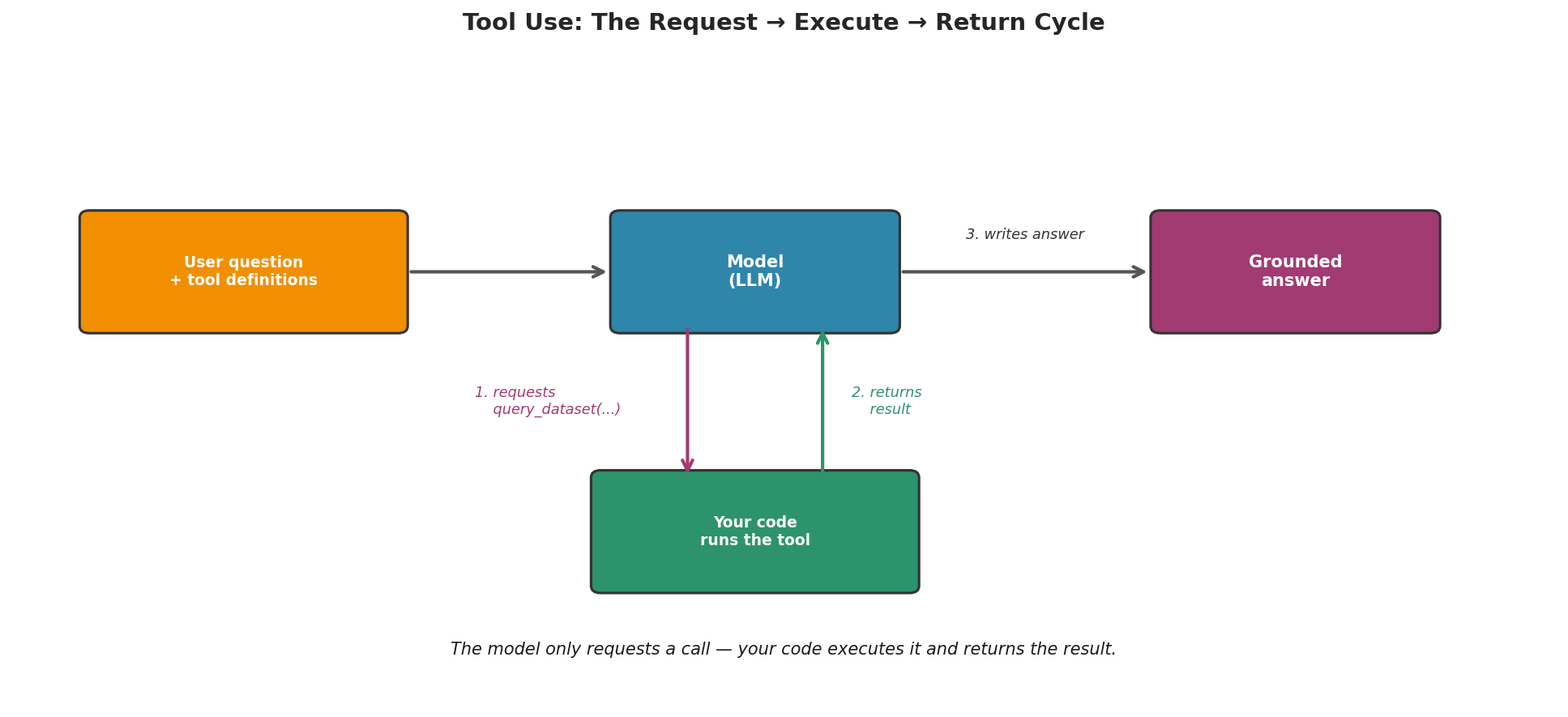
Fig. 241 Figure 6.7.1: The tool-use cycle. The model emits a structured request to call a tool; your code runs the function and returns the result; the model then writes its answer grounded in that result—it only requests, never executing anything itself.
The control never leaves your program. The model only ever emits a request; you decide whether, and how, to honor it.
Note
Early tool use was orchestrated entirely by hand: you described the tools in a
system prompt and parsed the model’s text output with regular expressions
(this is how Anthropic’s 2024 tutorial does it). Modern APIs support native
tool-calling—you pass structured tool definitions and the model returns a
structured tool_calls field. The conceptual cycle is identical; the plumbing
is now handled for you, as we will see with the @tool decorator below.
Declaring a Tool with @tool
In the GenAI Studio SDK, any typed Python function becomes a model-callable tool by adding the @tool decorator. The function’s type hints and docstring are the contract: they are turned, automatically, into the JSON Schema the model sees.
from genai_studio.agents import tool

@tool
def query_dataset(table: str, column: str, condition: str = "") -> str:
    """Return values from a named dataset, optionally filtered.

    Args:
        table: Name of the dataset to query (e.g. "patients").
        column: The column whose values to return.
        condition: Optional row filter, e.g. "age > 50".
    """
    # A real tool would query a database or DataFrame; stubbed with fixed data.
    data = {("patients", "cholesterol"): "172, 168, 195, 181, 204"}
    return data.get((table, column), "no rows")
A decorated function is still an ordinary function—you can unit-test it directly—but it now carries a .spec describing it. Printing the schema is the whole point: watch your function become a tool definition.
import json
print(json.dumps(query_dataset.spec.parameters, indent=2))
{
  "type": "object",
  "properties": {
    "table": {
      "type": "string",
      "description": "Name of the dataset to query (e.g. \"patients\")."
    },
    "column": {
      "type": "string",
      "description": "The column whose values to return."
    },
    "condition": {
      "type": "string",
      "description": "Optional row filter, e.g. \"age > 50\".",
      "default": ""
    }
  },
  "additionalProperties": false,
  "required": [
    "table",
    "column"
  ]
}
Notice what the model receives: the parameter names, their types, the human-readable descriptions taken verbatim from your docstring, and which arguments are required (table and column, since condition has a default). This is why a precise docstring matters—it is not documentation about the tool, it is the interface the model reads to decide how to call it. A vague description yields vague calls.
Note
A tool call is the model producing structured output—a function name plus
JSON arguments—so the formatting discipline from Section 6.6 applies directly. The schema @tool generates is
also compatible with the Model Context Protocol (MCP), an open standard
(Anthropic, 2024) for advertising tools and data to models in a uniform way, so
the same tool can be reused across applications rather than re-integrated each time.
A Single Tool Call, End to End
We now let the model actually use the tool. The low-level seam is chat_raw, which forwards tools= and tool_choice= to the model and returns the raw response—including the tool_calls the model wants to make. (Tool-calling support varies by model; we select one that supports it natively.)
import json
from genai_studio import GenAIStudio
from genai_studio.agents import tool

ai = GenAIStudio()
ai.select_model("qwen2.5:72b")   # supports native tool-calling (gemma3:12b does not)

# (query_dataset defined as above)

# 1. Offer the tool and ask a question that needs it.
messages = [{"role": "user",
             "content": "What is the average cholesterol of patients over 50?"}]
resp = ai.chat_raw(messages,
                   tools=[query_dataset.spec.to_openai()],
                   tool_choice="auto")

# 2. The model replies with a tool CALL, not a final answer.
call = resp.choices[0].message.tool_calls[0]
print(call.function.name)
print(call.function.arguments)
The model does not answer the question directly; it asks us to run the tool, returning something like:
query_dataset
{"table": "patients", "column": "cholesterol", "condition": "age > 50"}
We parse those arguments, run the function ourselves, and feed the result back so the model can finish:
# 3. YOUR code runs the requested function with the model's arguments.
args = json.loads(call.function.arguments)
result = query_dataset(**args)        # the model never executes this itself

# 4. Return the result as a "tool" message and ask the model to finish.
#    Note: we do NOT pass tools= on this turn — we want a written answer,
#    not another call. Offered the tool again, many models just re-call it.
messages.append(resp.choices[0].message)               # the assistant's tool call
messages.append({"role": "tool",
                 "tool_call_id": call.id,
                 "content": result})
final = ai.chat_raw(messages)        # no tools this turn
print(final.choices[0].message.content)
The final call—note we no longer pass tools, so the model writes prose instead of calling the tool again—returns a grounded answer such as “The average cholesterol of patients over 50 is about 184 mg/dL.”—and 184 is exactly the mean of the five values the stub returned. The exact wording varies (it is generated by the live model), but the mechanics are fixed: request → execute → return → answer. The model supplied the reasoning about which tool and what arguments; your code supplied the ground truth.
When to Use Tool Use
Tool use is not free—it adds latency, a second round trip, and new ways to fail. Reach for it when the task needs something the model genuinely lacks:
Current or live information — today’s data, a price, a recent event.
Exact computation — arithmetic, statistics, running code, anything where “approximately right” is wrong.
Private or external systems — your database, your files, an internal API.
Actions with effects — sending an email, writing a record (with the cautions in the next section).
Equally important is knowing when not to. If the model already does the task well—explaining a concept, drafting text, classifying sentiment—a tool only adds fragility. Encouragingly, models are reasonably good at this judgment: given a calculator tool but asked “What is the capital of France?”, a capable model answers directly and does not call the tool. The decision of whether a tool is warranted is itself part of what the model is doing.
A Statistical Perspective on Tool Use
Tool use changes the model’s job on the hard sub-task from estimation to routing. Asked to compute a mean, an LLM without tools produces a high-variance guess drawn from text patterns. With a tool, the numerical work is delegated to a deterministic function (zero variance, zero bias on that sub-task), and the model’s remaining task is the much easier one of selecting the right tool and arguments. You are trading a noisy end-to-end estimate for a reliable computation plus a lighter selection decision.
Risks and Safeguards
Handing a model the ability to trigger code introduces failure modes that pure text generation does not have.
Wrong or malformed arguments. The model may extract the wrong values or produce arguments that violate your schema. Weng (2023) notes that even on a simple calculator, smaller models “failed to extract the right arguments for basic arithmetic reliably.” Safeguard: validate every argument against the schema before executing; reject and, if useful, report the error back so the model can retry.
Calling the wrong tool, or calling one unnecessarily. With several tools available, the model can pick a poor fit, or invoke a tool when none was needed. Safeguard: keep tool sets small and descriptions sharp; the Toolformer authors observed that models are “very sensitive to the exact wording” of when to call an API.
Executing actions is a security boundary. This is the serious one. A tool that only reads is low-risk; a tool that writes, deletes, spends, or runs arbitrary code lets a model’s output reach the real world. Never expose such a tool without controls. The SDK’s shipped calculator illustrates the principle: it evaluates arithmetic safely and refuses inputs like __import__('os').system(...) or open('x') rather than executing them.
Practical safeguards, in order of importance:
Validate arguments against the schema before running anything.
Allowlist tools—expose only what the task needs, nothing more.
Sandbox any tool that executes code or touches the filesystem.
Require human confirmation for actions with side effects (deletes, sends, payments).
Log every call—tool name, arguments, result—so behavior is auditable.
Where Tool Use Ends and Agents Begin
Everything above is a single round trip: the model requests one tool call, you run it, the model answers. The natural next step is to put that cycle in a loop—let the model see the result, decide on the next call, and repeat until it is done. That loop is an agent.
Weng (2023) frames an LLM agent as a model “brain” plus three components: planning, memory, and tool use. Plain tool use, the subject of this section, is just that third component used once. An agent wraps it in a planning-and-memory loop (the ReAct Thought → Action → Observation pattern is the classic example) so the model drives a multi-step task autonomously.
That autonomy is powerful but costly in reliability. As the practitioners behind “What We’ve Learned from a Year of Building with LLMs” observe, an agent’s chance of completing a multi-step task “decreases exponentially as the number of steps increases.” Each added step multiplies the failure probability. For that reason—and because robust agents bring in planning, evaluation, and orchestration concerns well beyond this chapter—STAT 418 stops at single tool use. The GenAI Studio SDK does ship a full agent framework (genai_studio.agents.Agent) for those who wish to explore further, but we will not use it here.
Chapter 6.7 Exercises: Tool Use
Exercise 6.7.1 — Build and Inspect a Tool
Write a
@tool-decorated functionz_score(value: float, mean: float, sd: float)that returns the standardized score(value - mean) / sd. Give it a clear docstring with anArgs:section.Print
z_score.spec.parametersand confirm the JSON Schema matches your type hints and docstring. Which arguments are listed asrequired, and why?Call
z_scoredirectly (no model involved) to confirm it still works as an ordinary function.
Solution
import json
from genai_studio.agents import tool

@tool
def z_score(value: float, mean: float, sd: float) -> str:
    """Standardize a value against a distribution's mean and SD.

    Args:
        value: The observed value to standardize.
        mean: The distribution mean.
        sd: The distribution standard deviation (must be > 0).
    """
    return str((value - mean) / sd)

print(json.dumps(z_score.spec.parameters, indent=2))
# All three (value, mean, sd) are 'required' — none has a default.

print("direct call:", z_score(value=130, mean=100, sd=15))  # 2.0
Exercise 6.7.2 — Tool, or No Tool?
For each request, decide whether a capable model should answer directly or call a tool, and justify your choice in one sentence:
“What is 17.3% of 4,182,905?”
“Summarize the main idea of this paragraph.”
“How many rows in the
salestable haveregion = 'West'?”“What does a p-value represent?”
“What is today’s date?”
Solution
Tool (calculator) — exact arithmetic; the model would approximate.
No tool — summarization is a core language capability.
Tool (database query) — the model has no access to your live table.
No tool — a definition the model knows well.
Tool (clock/calendar) — the current date is state the model lacks.
Exercise 6.7.3 — Make a Dangerous Tool Safe
Suppose you are tempted to expose this tool to a model:
@tool
def run_sql(query: str) -> str:
    """Execute an arbitrary SQL query and return the result."""
    return database.execute(query)   # runs ANYTHING the model sends
Name two concrete ways this could go wrong if the model produces a bad or malicious
query.Propose at least two safeguards (from this section) that would contain the risk.
Sketch a safer design—e.g., a
read_only_querytool that rejects anything other thanSELECT, or a parameterizedquery_datasetlike the one in this section that never lets the model write raw SQL.
Solution
The model could emit a destructive statement (
DROP TABLE,DELETE), or a query that exfiltrates data it should not touch. The tool executes whatever arrives—an action with real side effects.Validate/allowlist (accept only
SELECT); sandbox (connect with a read-only database role); require confirmation for any write; log every query. Restricting the interface (no raw SQL) is stronger than policing strings.Replace
run_sqlwith a constrained tool whose parameters cannot express a destructive operation:@tool def read_only_query(table: str, column: str, condition: str = "") -> str: """Read values from one table; cannot modify the database. Args: table: Table to read from (must be on the allowlist). column: Column to return. condition: Optional WHERE filter. """ ALLOWED = {"sales", "patients", "products"} if table not in ALLOWED: return f"Error: '{table}' is not a readable table." # Parameterized read against a read-only connection. return readonly_db.select(table, column, condition)
Transition to What Follows
Tool use extends what an LLM can do, but it also widens the surface where things can go wrong: a confident answer might now rest on a misread argument or a mischosen tool. That makes reliability and evaluation—how we measure whether to trust an LLM-assisted result—the natural next concern, and responsible use all the more important once a model’s outputs can touch real data and systems. Both are taken up in the sections that follow.
Key Takeaways
Key Takeaways 📝
Tool use (function calling) lets a model offload what it does worst—exact computation, current data, access to private systems—to functions that do it right. The model requests a call; your code runs it and returns the result.
The cycle is request → execute → return → answer. The model never executes anything itself; control stays in your program.
``@tool`` turns a typed function into a tool, deriving the JSON Schema the model sees from your type hints and docstring—so a precise docstring is the interface, not just documentation.
Use a tool when the model lacks something (live data, exact math, your systems); skip it when the model already does the task well.
Executing model-chosen actions is a security boundary. Validate arguments, allowlist and sandbox tools, require confirmation for side effects, and log every call. Chaining tool calls in an autonomous loop is an agent—powerful, less reliable with each step, and beyond this course.