Section 6.3 Text Preprocessing for LLM Pipelines
Before text reaches a language model, it must pass through a series of transformations that are easy to overlook but difficult to recover from when done poorly. A model that receives HTML tags alongside article text will waste tokens on markup. A document that exceeds the model’s context window will be silently truncated, losing potentially critical information. A pipeline that chunks text mid-sentence will produce embeddings that capture fragments rather than ideas.
Text preprocessing for LLMs differs from traditional NLP preprocessing. Classical pipelines aggressively transform text—lowercasing, stemming, removing stop words—because the downstream model (a bag-of-words classifier, say) benefits from reduced vocabulary. LLMs, by contrast, understand language; they benefit from well-formed, natural text. The goal is not to simplify the text but to ensure it arrives in a form the model can process effectively within its constraints.
This section develops the preprocessing pipeline that sits between raw data and the LLM techniques of subsequent sections. We focus on three critical steps: understanding how models see text (tokenization), managing the fundamental constraint of context windows, and dividing long documents into meaningful chunks.
Road Map 🧭
Understand how tokenizers convert text to tokens—the actual units models process
Manage context windows as a fixed token budget that constrains everything
Choose chunking strategies appropriate for different document types and downstream tasks
Build preprocessing pipelines that clean, normalize, and prepare text for LLM consumption
Tokenization: How Models See Text
Subword Tokenization
Language models do not process text character by character or word by word. They use subword tokenization, which splits text into units called tokens that balance vocabulary size against sequence length.
Common English words typically map to a single token (“the”, “cat”, “important”). Rare or technical words are split into subword pieces: “immunohistochemistry” might become [“immun”, “oh”, “ist”, “oche”, “mist”, “ry”]. Numbers, punctuation, and code often tokenize unpredictably: “3.14159” might become [“3”, “.”, “14”, “159”].
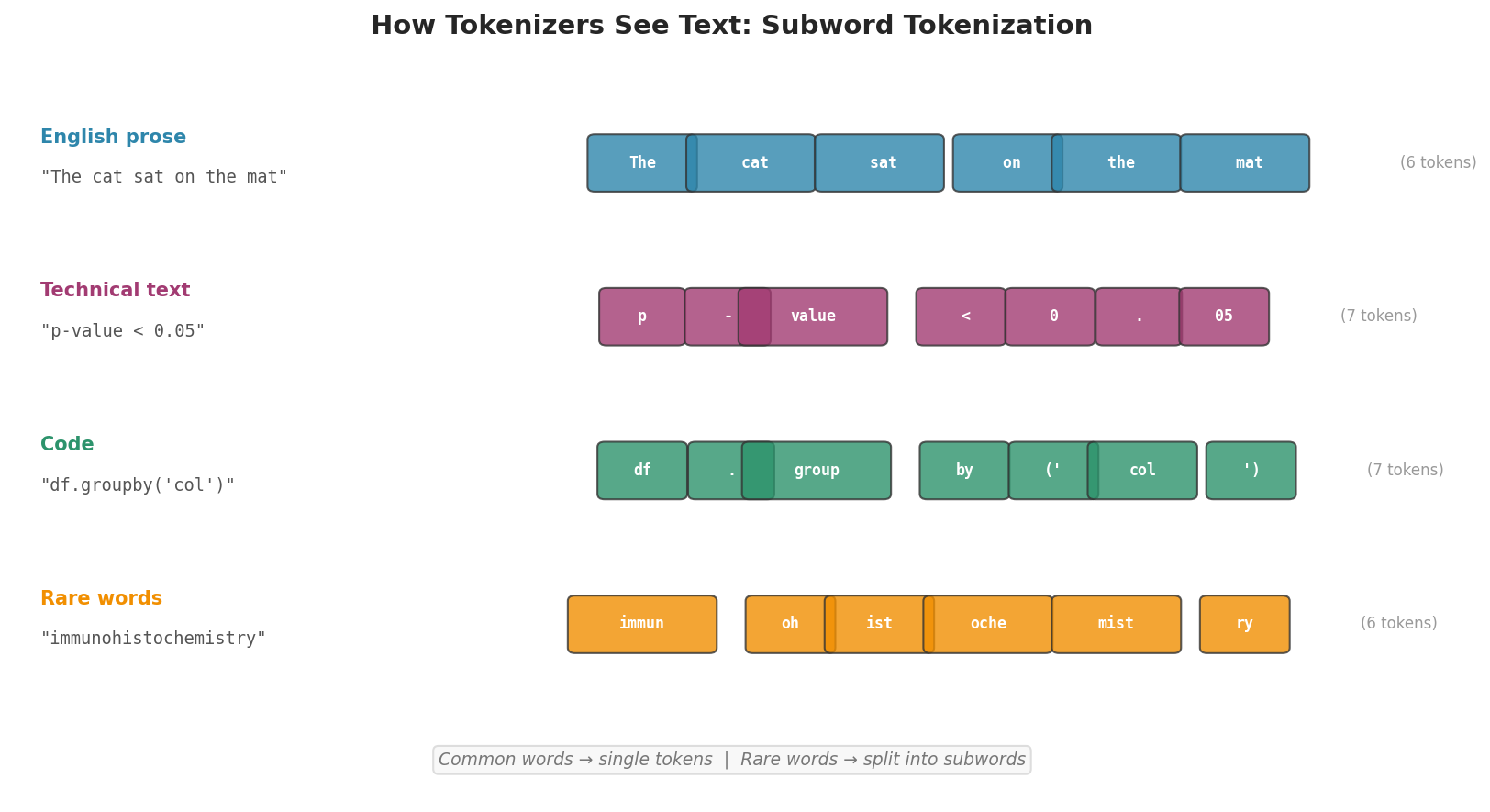
Fig. 222 Figure 6.3.1: Subword tokenization in action. Common English words become single tokens, while rare or technical terms are split into multiple subword pieces. Code and mathematical notation often tokenize less efficiently than prose.
Why does this matter for data scientists? Because everything in an LLM pipeline is measured in tokens, not words or characters. Context windows, API pricing, embedding input limits, and generation budgets are all denominated in tokens. A rough heuristic: 1 token ≈ 0.75 English words, or equivalently, 1 English word ≈ 1.3 tokens. But this ratio varies significantly with content type.
Counting Tokens in Practice
Since we cannot directly access the tokenizer used by models on GenAI Studio, we measure token counts indirectly: send text through chat_complete() and read back the token usage the gateway reports for the full prompt:
from genai_studio import GenAIStudio
ai = GenAIStudio()
ai.select_model("llama3.2:latest")

# Use chat_complete to measure token usage
test_text = ("The bootstrap resamples data with replacement to estimate "
             "the sampling distribution of a statistic. By repeating this "
             "process thousands of times, we build an empirical approximation "
             "to the true sampling distribution.")

prompt = f"Repeat the following text exactly: {test_text}"
response = ai.chat_complete(prompt)
print(f"Prompt tokens: {response.prompt_tokens}")
print(f"Completion tokens: {response.completion_tokens}")
print(f"Total tokens: {response.total_tokens}")
print(f"Word count: {len(prompt.split())}")
print(f"Token/word ratio: {response.prompt_tokens / len(prompt.split()):.2f}")
Prompt tokens: 52
Completion tokens: 43
Total tokens: 95
Word count: 40
Token/word ratio: 1.30
Token Estimation Heuristics
For planning purposes, use these approximations:
def estimate_tokens(text, method="words"):
    """Estimate token count from text.

    The word-based heuristic (1 word ≈ 1.3 tokens) is reasonably
    accurate for English prose. Character-based (1 token ≈ 4 chars)
    is better for mixed content (code, URLs, technical text).
    """
    if method == "words":
        return int(len(text.split()) * 1.3)
    elif method == "chars":
        return len(text) // 4
    else:
        raise ValueError(f"Unknown method: {method}")

sample = "The bootstrap resamples data with replacement."
print(f"Word estimate: {estimate_tokens(sample, 'words')} tokens")
print(f"Char estimate: {estimate_tokens(sample, 'chars')} tokens")
Word estimate: 7 tokens
Char estimate: 11 tokens
These are approximations. For production pipelines where token counts matter (e.g., staying within context windows), always measure actual token usage with chat_complete() on representative samples.
Context Windows and Token Limits
What Context Windows Mean
Every language model has a context window—the maximum number of tokens it can process in a single call. This window must contain everything: system prompts, user input, and the model’s response. If the total exceeds the window, input is truncated or the call fails.
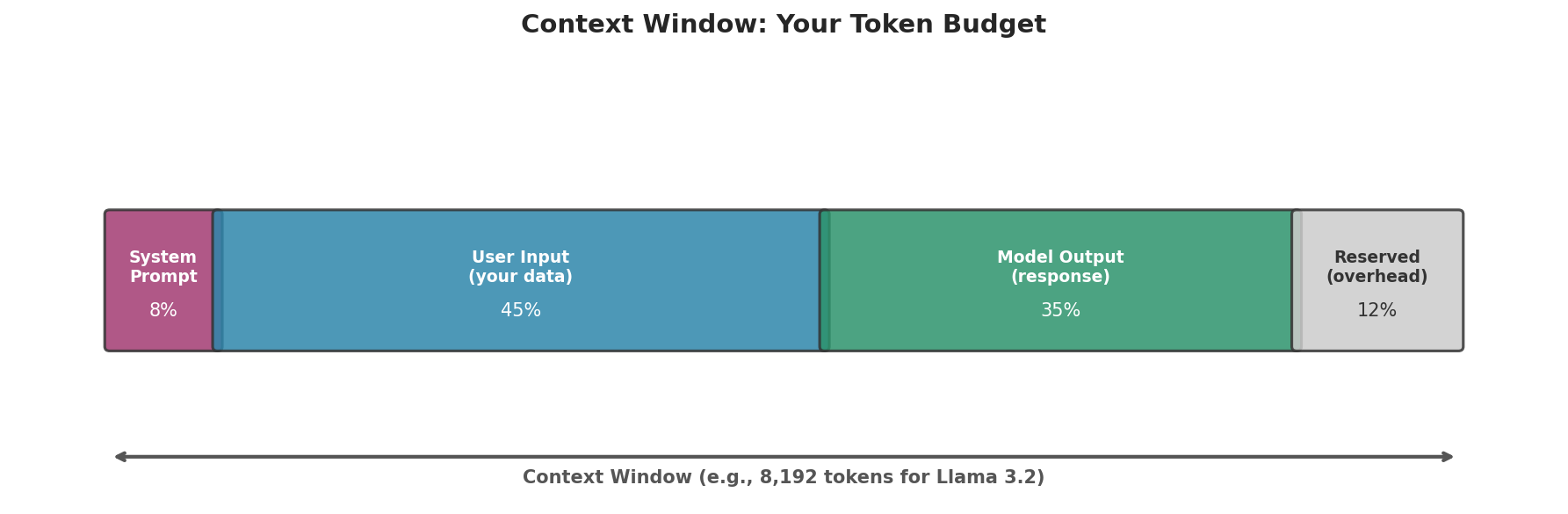
Fig. 223 Figure 6.3.2: The context window is a fixed token budget shared between system prompt, user input, and model output. For a model with an 8,192-token window, a 500-token system prompt and a 1,000-token expected output leave roughly 6,700 tokens for your actual data.
Context Window Sizes on GenAI Studio
The models available on GenAI Studio have varying context windows:
Model |
Context Window |
Notes |
|---|---|---|
llama3.2:latest |
8,192 tokens |
Good balance of capability and context |
mistral:latest |
8,192 tokens |
Fast, efficient for shorter tasks |
gemma3:12b |
8,192 tokens |
Strong general-purpose model |
phi4:latest |
16,384 tokens |
Larger context window |
deepseek-r1:1.5b |
8,192 tokens |
Smallest model, fastest inference |
Managing the Token Budget
A practical function for checking whether text fits within a model’s context window:
def check_fits_context(text, model_context=8192,
                       system_tokens=200, output_tokens=1000):
    """Check if text fits within the context window budget."""
    estimated_input = estimate_tokens(text, "words")
    available = model_context - system_tokens - output_tokens
    fits = estimated_input <= available

    print(f"Context window:  {model_context:,} tokens")
    print(f"System prompt:  -{system_tokens:,}")
    print(f"Output reserve: -{output_tokens:,}")
    print(f"Available:       {available:,} tokens")
    print(f"Input estimate:  {estimated_input:,} tokens")
    print(f"Fits: {'Yes' if fits else 'NO — chunking required'}")
    return fits

short_text = "The mean is sensitive to outliers. " * 10
long_text = "Statistical analysis reveals patterns. " * 5000

print("Short text:")
check_fits_context(short_text)
print("\nLong text:")
check_fits_context(long_text)
Short text:
Context window:  8,192 tokens
System prompt:  -200
Output reserve: -1,000
Available:       6,992 tokens
Input estimate:  78 tokens
Fits: Yes

Long text:
Context window:  8,192 tokens
System prompt:  -200
Output reserve: -1,000
Available:       6,992 tokens
Input estimate:  26,000 tokens
Fits: NO — chunking required
When text does not fit, we have two options: use a model with a larger context window, or chunk the text into smaller pieces. Chunking is almost always the more robust approach, because it works regardless of model and scales to arbitrarily long documents.
Chunking Strategies
Chunking divides a long document into smaller segments, each of which fits within the model’s context window. The challenge is choosing where to split: cuts in the wrong places destroy context and produce incoherent fragments.
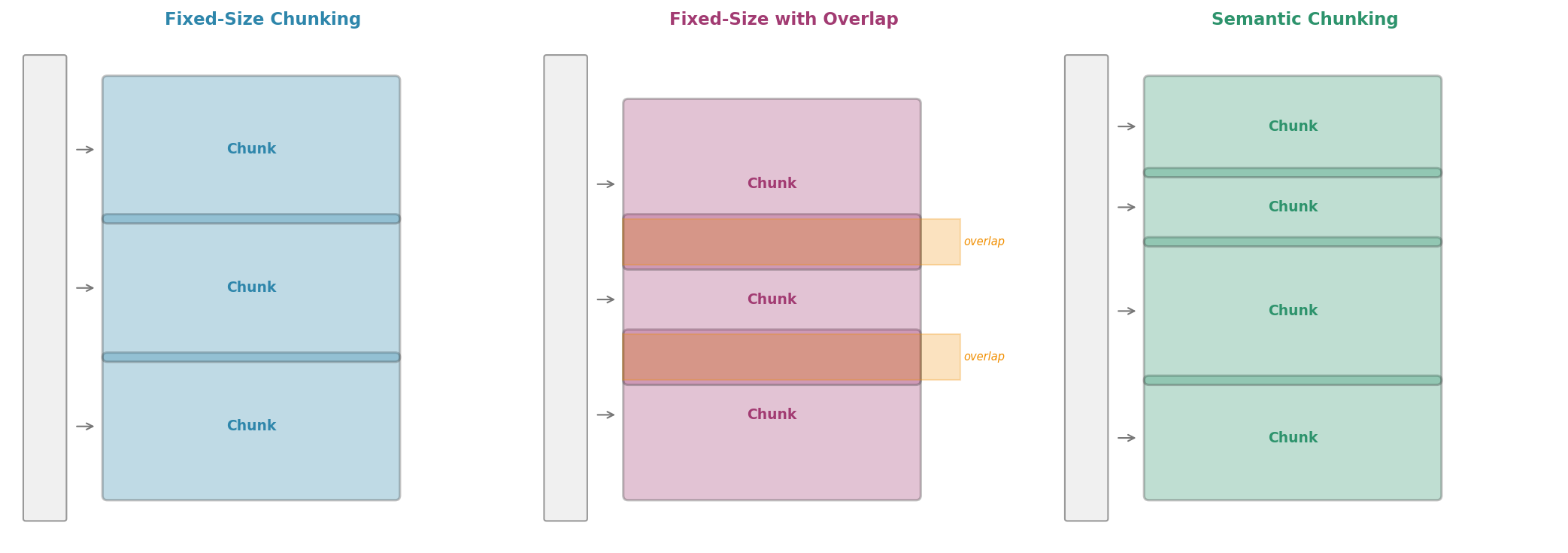
Fig. 224 Figure 6.3.3: Three chunking strategies. Fixed-size chunking is simple but may split mid-sentence. Overlap ensures no information is lost at boundaries. Semantic chunking splits at natural boundaries (paragraphs, sections) for more coherent chunks.
Fixed-Size Chunking
The simplest approach: split text into chunks of approximately equal token count.
def chunk_fixed_size(text, chunk_size=500, unit="words"):
    """Split text into fixed-size chunks by word count.

    A rough proxy for token count (1 word ≈ 1.3 tokens).
    For more precise control, use character-based chunking
    with chunk_size = desired_tokens * 4.
    """
    words = text.split()
    chunks = []
    for i in range(0, len(words), chunk_size):
        chunk = " ".join(words[i:i + chunk_size])
        chunks.append(chunk)
    return chunks

# Example with a long text
long_text = " ".join([f"Sentence {i} discusses topic {i % 5}." for i in range(200)])
chunks = chunk_fixed_size(long_text, chunk_size=50)
print(f"Document: {len(long_text.split())} words")
print(f"Chunks: {len(chunks)}")
for i, chunk in enumerate(chunks[:3]):
    print(f"\n  Chunk {i} ({len(chunk.split())} words): {chunk[:80]}...")
Document: 1000 words
Chunks: 20

  Chunk 0 (50 words): Sentence 0 discusses topic 0. Sentence 1 discusses topic 1. Sentence 2 discusses...
  Chunk 1 (50 words): Sentence 10 discusses topic 0. Sentence 11 discusses topic 1. Sentence 12 discus...
  Chunk 2 (50 words): Sentence 20 discusses topic 0. Sentence 21 discusses topic 1. Sentence 22 discus...
Fixed-size chunking is fast and predictable but crude. It may split mid-sentence, breaking coherence. This is acceptable for some tasks (e.g., embedding large corpora for approximate search) but problematic when context matters.
Chunking with Overlap
Adding overlap between consecutive chunks ensures that information near boundaries is not lost:
def chunk_with_overlap(text, chunk_size=500, overlap=50):
    """Split text into overlapping chunks.

    Overlap ensures no information falls into a gap between chunks.
    Typical overlap: 10-20% of chunk_size.
    """
    words = text.split()
    chunks = []
    step = chunk_size - overlap
    for i in range(0, len(words), step):
        chunk = " ".join(words[i:i + chunk_size])
        if chunk:
            chunks.append(chunk)
        if i + chunk_size >= len(words):
            break
    return chunks

chunks_overlap = chunk_with_overlap(long_text, chunk_size=50, overlap=10)
print(f"Chunks without overlap: {len(chunks)}")
print(f"Chunks with overlap: {len(chunks_overlap)}")
print(f"Overlap cost: {len(chunks_overlap) - len(chunks)} extra chunks "
      f"({(len(chunks_overlap)/len(chunks) - 1)*100:.0f}% more)")
Chunks without overlap: 20
Chunks with overlap: 25
Overlap cost: 5 extra chunks (25% more)
The trade-off is clear: overlap improves boundary coverage but increases the total number of chunks (and therefore embedding or LLM costs). A 10–20% overlap is usually sufficient.
Semantic Chunking
Semantic chunking splits at natural document boundaries—paragraphs, section headers, or sentence endings—rather than at arbitrary word counts:
import re

def chunk_semantic(text, max_chunk_size=500):
    """Split text at paragraph boundaries, merging small paragraphs.

    Respects natural document structure by never splitting
    mid-paragraph. Merges consecutive short paragraphs until
    the chunk approaches max_chunk_size words.
    """
    paragraphs = [p.strip() for p in text.split('\n\n') if p.strip()]

    chunks = []
    current_chunk = []
    current_size = 0

    for para in paragraphs:
        para_size = len(para.split())
        if current_size + para_size > max_chunk_size and current_chunk:
            chunks.append('\n\n'.join(current_chunk))
            current_chunk = [para]
            current_size = para_size
        else:
            current_chunk.append(para)
            current_size += para_size

    if current_chunk:
        chunks.append('\n\n'.join(current_chunk))

    return chunks

# Example with structured text
structured_text = """
Introduction to Bootstrap Methods

The bootstrap is a resampling method introduced by Bradley Efron in 1979.
It estimates the sampling distribution of a statistic by repeatedly
resampling from the observed data with replacement.

How the Bootstrap Works

Given a dataset of n observations, we draw n samples with replacement
to create a bootstrap sample. We compute the statistic of interest
on this sample. Repeating this B times gives B bootstrap estimates.

Confidence Intervals

The percentile method takes the alpha/2 and 1-alpha/2 quantiles of
the bootstrap distribution as confidence interval endpoints. This
is simple but can be improved with bias-corrected methods.

Advantages and Limitations

The bootstrap requires no distributional assumptions, making it
widely applicable. However, it can fail for heavy-tailed distributions
or when the sample size is very small.
""".strip()

chunks = chunk_semantic(structured_text, max_chunk_size=40)
for i, chunk in enumerate(chunks):
    print(f"Chunk {i} ({len(chunk.split())} words):")
    print(f"  {chunk[:100]}...")
    print()
Chunk 0 (37 words):
  Introduction to Bootstrap Methods

The bootstrap is a resampling method introduced by Bradley Efron ...

Chunk 1 (36 words):
  Given a dataset of n observations, we draw n samples with replacem...

Chunk 2 (30 words):
  The percentile method takes the alpha/2 and 1-alpha/2 quantiles o...

Chunk 3 (25 words):
  The bootstrap requires no distributional assumptions, making it w...
Semantic chunking never splits mid-paragraph, so every chunk reads as coherent prose. The word counts reveal one limitation of the greedy merger, though: a short heading always fits in the chunk being built, so “How the Bootstrap Works” is absorbed into the tail of Chunk 0 rather than leading Chunk 1—production chunkers treat headings as boundaries that force a new chunk. Even so, structure-aware chunking is the right default for tasks where context coherence matters—such as embedding for RAG (see Section 6.5) or feeding to an LLM for annotation.
Choosing a Chunking Strategy
Strategy |
Best For |
Advantages |
Disadvantages |
|---|---|---|---|
Fixed-size |
Large corpora, approximate search |
Simple, predictable size |
May break mid-sentence |
Fixed + overlap |
Embedding for retrieval |
No boundary information loss |
More chunks, higher cost |
Semantic |
RAG, annotation, analysis |
Preserves document structure |
Variable chunk sizes |
Recursive |
Complex documents |
Hierarchical splitting |
More complex to implement |
Text Normalization and Cleaning
Chunking solves the size problem; normalization solves the quality problem. However carefully we split a document, each chunk is only as useful as the text inside it—and text scraped from web pages, PDFs, or logs rarely arrives clean.
Standard Cleaning Pipeline
Real-world text often contains artifacts that waste tokens and confuse models: HTML tags, duplicate whitespace, encoding errors, and invisible Unicode characters.
import re

def clean_text(text):
    """Standard text cleaning for LLM input.

    Removes HTML, fixes whitespace, and normalizes Unicode.
    Deliberately does NOT lowercase, stem, or remove stop words—
    LLMs benefit from natural, well-formed text.
    """
    # Remove HTML tags
    text = re.sub(r'<[^>]+>', '', text)
    # Remove URLs
    text = re.sub(r'https?://\S+', '[URL]', text)
    # Normalize whitespace (collapse multiple spaces/newlines)
    text = re.sub(r'\s+', ' ', text)
    # Remove control characters (but keep newlines for structure)
    text = re.sub(r'[\x00-\x08\x0b\x0c\x0e-\x1f\x7f]', '', text)
    return text.strip()

raw = """<p>This is a <b>test</b> of the   cleaning pipeline.</p>
Visit https://example.com/very/long/url for more info.
Extra    spaces   and\ttabs\there.
"""
cleaned = clean_text(raw)
print(f"Raw ({len(raw)} chars): {repr(raw[:80])}")
print(f"Clean ({len(cleaned)} chars): {cleaned}")
Raw (154 chars): '<p>This is a <b>test</b> of the   cleaning pipeline.</p>\nVisit https://example'
Clean (81 chars): This is a test of the cleaning pipeline. Visit [URL] for more info. Extra spaces and tabs here.
When NOT to Normalize
LLMs are not traditional NLP models. Aggressive preprocessing can remove information the model needs:
Do not lowercase: Case carries meaning (“Apple” the company vs. “apple” the fruit).
Do not remove stop words: LLMs understand grammar; removing “not” from “not significant” inverts meaning.
Do not stem or lemmatize: The model’s tokenizer handles morphological variation.
Do not remove punctuation: Sentence boundaries, questions, and emphasis depend on punctuation.
The principle: clean noise (HTML, encoding errors, duplicate whitespace) but preserve signal (case, grammar, punctuation, natural phrasing).
Building a Complete Preprocessing Pipeline
A production preprocessing pipeline combines all the steps above into a single, testable function:
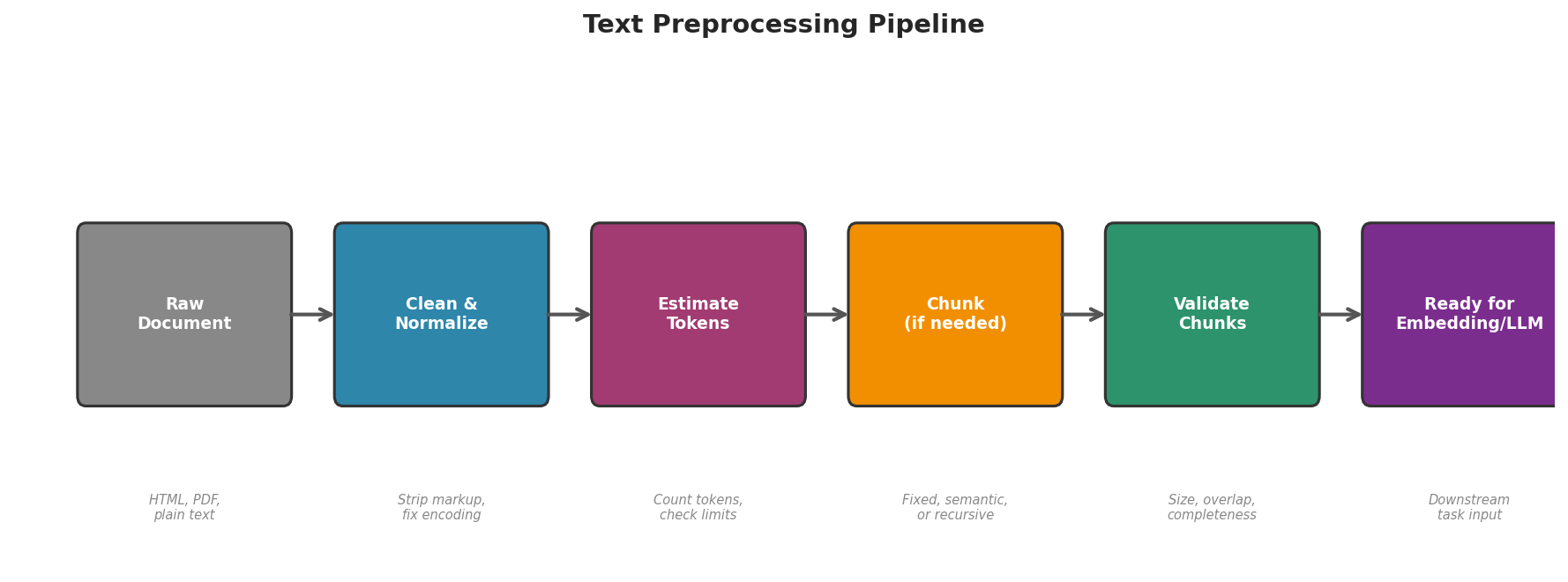
Fig. 225 Figure 6.3.4: The preprocessing pipeline from raw document to LLM-ready chunks. Each stage can be tested independently, and the pipeline can be adapted for different document types and downstream tasks.
import re

class TextPreprocessor:
    """Configurable text preprocessing pipeline for LLM workflows."""

    def __init__(self, chunk_size=500, overlap=50, strategy="semantic"):
        self.chunk_size = chunk_size
        self.overlap = overlap
        self.strategy = strategy

    def clean(self, text):
        """Remove noise while preserving natural language structure."""
        text = re.sub(r'<[^>]+>', '', text)
        text = re.sub(r'https?://\S+', '[URL]', text)
        text = re.sub(r'\s+', ' ', text)
        text = re.sub(r'[\x00-\x08\x0b\x0c\x0e-\x1f\x7f]', '', text)
        return text.strip()

    def chunk(self, text):
        """Split text into chunks using the configured strategy."""
        if self.strategy == "fixed":
            return self._chunk_fixed(text)
        elif self.strategy == "overlap":
            return self._chunk_overlap(text)
        elif self.strategy == "semantic":
            return self._chunk_semantic(text)
        else:
            raise ValueError(f"Unknown strategy: {self.strategy}")

    def _chunk_fixed(self, text):
        words = text.split()
        return [" ".join(words[i:i+self.chunk_size])
                for i in range(0, len(words), self.chunk_size)]

    def _chunk_overlap(self, text):
        words = text.split()
        chunks = []
        step = self.chunk_size - self.overlap
        for i in range(0, len(words), step):
            chunk = " ".join(words[i:i+self.chunk_size])
            if chunk:
                chunks.append(chunk)
            if i + self.chunk_size >= len(words):
                break
        return chunks

    def _chunk_semantic(self, text):
        paragraphs = [p.strip() for p in text.split('\n\n') if p.strip()]
        chunks, current, size = [], [], 0
        for para in paragraphs:
            para_size = len(para.split())
            if size + para_size > self.chunk_size and current:
                chunks.append('\n\n'.join(current))
                current, size = [para], para_size
            else:
                current.append(para)
                size += para_size
        if current:
            chunks.append('\n\n'.join(current))
        return chunks

    def process(self, text):
        """Full pipeline: clean → check size → chunk if needed."""
        cleaned = self.clean(text)
        word_count = len(cleaned.split())
        estimated_tokens = int(word_count * 1.3)

        if estimated_tokens <= self.chunk_size:
            return [cleaned]
        return self.chunk(cleaned)

    def validate(self, chunks):
        """Check that all chunks meet size constraints."""
        report = {
            "n_chunks": len(chunks),
            "sizes": [len(c.split()) for c in chunks],
            "total_words": sum(len(c.split()) for c in chunks),
            "all_within_limit": all(
                len(c.split()) <= self.chunk_size * 1.1 for c in chunks
            ),
        }
        return report

# Usage
preprocessor = TextPreprocessor(chunk_size=100, overlap=15, strategy="overlap")
long_doc = " ".join([f"Paragraph {i} covers topic {i % 3}. " * 10
                     for i in range(20)])
chunks = preprocessor.process(long_doc)
report = preprocessor.validate(chunks)

print(f"Input: {len(long_doc.split())} words")
print(f"Chunks: {report['n_chunks']}")
print(f"Chunk sizes: {report['sizes'][:5]}...")
print(f"All within limit: {report['all_within_limit']}")
Input: 1000 words
Chunks: 12
Chunk sizes: [100, 100, 100, 100, 100]...
All within limit: True
Pipeline Validation
Always validate your preprocessing pipeline before running it at scale:
def validate_pipeline(preprocessor, sample_texts):
    """Test preprocessing on sample texts and report statistics."""
    all_reports = []
    for text in sample_texts:
        chunks = preprocessor.process(text)
        report = preprocessor.validate(chunks)
        all_reports.append(report)

    total_chunks = sum(r['n_chunks'] for r in all_reports)
    all_sizes = [s for r in all_reports for s in r['sizes']]

    print(f"Documents processed: {len(sample_texts)}")
    print(f"Total chunks: {total_chunks}")
    print(f"Avg chunks/doc: {total_chunks/len(sample_texts):.1f}")
    print(f"Chunk size range: [{min(all_sizes)}, {max(all_sizes)}] words")
    print(f"Mean chunk size: {sum(all_sizes)/len(all_sizes):.0f} words")
    print(f"All within limit: {all(r['all_within_limit'] for r in all_reports)}")

sample_docs = [
    "Short text that fits in one chunk.",
    " ".join(["Medium text. "] * 100),
    " ".join(["Long document with many paragraphs. "] * 500),
]
validate_pipeline(preprocessor, sample_docs)
Documents processed: 3
Total chunks: 34
Avg chunks/doc: 11.3
Chunk size range: [7, 100] words
Mean chunk size: 93 words
All within limit: True
Chapter 6.3 Exercises: Text Preprocessing
Exercise 6.3.1 — Tokenization Explorer
Write a function that uses
chat_complete()to measure the token count of a given text. Test it on five different content types: (1) standard English prose, (2) Python code, (3) a URL-heavy web page, (4) a mathematical expression, (5) text in a language other than English.Compute the token-to-word ratio for each content type. Which content types are most and least “token-efficient”?
Based on your findings, explain why token estimation heuristics need to account for content type.
Solution
def measure_tokens(text, ai):
    """Measure actual token count by sending text through chat_complete."""
    response = ai.chat_complete(f"Repeat exactly: {text}")
    words = len(text.split())
    chars = len(text)
    return {
        "text_preview": text[:50],
        "words": words,
        "chars": chars,
        "prompt_tokens": response.prompt_tokens,
        "token_word_ratio": response.prompt_tokens / max(words, 1),
        "token_char_ratio": response.prompt_tokens / max(chars, 1),
    }

test_cases = {
    "prose": "The bootstrap method estimates sampling variability by "
             "repeatedly drawing samples with replacement from the data.",
    "code": "def bootstrap(data, n=1000):\n    return [np.mean("
            "np.random.choice(data, len(data))) for _ in range(n)]",
    "urls": "Visit https://genai.rcac.purdue.edu/api/v1 and "
            "https://docs.python.org/3/library/statistics.html",
    "math": "E[X] = Σ x_i * P(x_i), Var(X) = E[X²] - (E[X])²",
    "spanish": "El método bootstrap estima la variabilidad muestral "
               "mediante remuestreo con reemplazo de los datos.",
}

for content_type, text in test_cases.items():
    result = measure_tokens(text, ai)
    print(f"{content_type:8s}: {result['token_word_ratio']:.2f} "
          f"tokens/word ({result['prompt_tokens']} tokens, "
          f"{result['words']} words)")
Exercise 6.3.2 — Chunking Strategy Comparison
Create a long document (1,000+ words) with clear section structure (headers, paragraphs). Chunk it using fixed-size, fixed-size with overlap, and semantic strategies, all targeting ~200-word chunks.
Embed each set of chunks using
ai.embed()and compute the average within-chunk cosine similarity to the full document embedding. Which chunking strategy produces chunks that are most representative of the full document?For the fixed-size strategy, deliberately create a chunk that splits mid-sentence. Show how this affects the embedding compared to a clean sentence-boundary chunk.
Solution
import numpy as np

document = """
Introduction to Statistical Learning

Statistical learning refers to a vast set of tools for
understanding data. These tools can be classified as supervised
or unsupervised.

Supervised Learning

In supervised learning, for each observation of the predictor
measurements, there is an associated response measurement.
We wish to fit a model that relates the response to the predictors.

Unsupervised Learning

In unsupervised learning, for every observation, we observe
a vector of measurements but no associated response. We seek
to understand the relationships between the variables.

Model Assessment

In order to evaluate the performance of a statistical learning
method, we need some way to measure how well its predictions
match the observed data. The most common approach is to compute
the mean squared error.
""".strip()

preprocessor_fixed = TextPreprocessor(chunk_size=30, strategy="fixed")
preprocessor_overlap = TextPreprocessor(chunk_size=30, overlap=5, strategy="overlap")
preprocessor_semantic = TextPreprocessor(chunk_size=30, strategy="semantic")

chunks_fixed = preprocessor_fixed.process(document)
chunks_overlap = preprocessor_overlap.process(document)
chunks_semantic = preprocessor_semantic.process(document)

doc_emb = ai.embed(document)

for name, chunks in [("Fixed", chunks_fixed),
                     ("Overlap", chunks_overlap),
                     ("Semantic", chunks_semantic)]:
    chunk_embs = ai.embed(chunks)
    sims = [GenAIStudio.cosine_similarity(doc_emb, ce) for ce in chunk_embs]
    print(f"{name:8s}: {len(chunks)} chunks, "
          f"avg similarity to full doc: {np.mean(sims):.4f}")
Exercise 6.3.3 — Context Window Budget Calculator
Write a ContextBudget class that:
Takes a model’s context window size, system prompt, and desired output length.
Computes the remaining token budget for user input.
Given a long text, determines whether chunking is needed and, if so, how many chunks.
Reports a complete budget breakdown.
Test it with a 2,000-word document against the 8,192-token window of llama3.2.
Solution
class ContextBudget:
    def __init__(self, context_window=8192, system_tokens=200,
                 output_tokens=1000, safety_margin=100):
        self.context_window = context_window
        self.system_tokens = system_tokens
        self.output_tokens = output_tokens
        self.safety_margin = safety_margin
        self.available = (context_window - system_tokens
                          - output_tokens - safety_margin)

    def analyze(self, text):
        est_tokens = int(len(text.split()) * 1.3)
        needs_chunking = est_tokens > self.available
        n_chunks = max(1, (est_tokens // self.available) + 1) if needs_chunking else 1

        return {
            "context_window": self.context_window,
            "system_tokens": self.system_tokens,
            "output_reserve": self.output_tokens,
            "safety_margin": self.safety_margin,
            "available_for_input": self.available,
            "estimated_input_tokens": est_tokens,
            "needs_chunking": needs_chunking,
            "recommended_chunks": n_chunks,
        }

    def report(self, text):
        analysis = self.analyze(text)
        for key, val in analysis.items():
            print(f"  {key}: {val}")

budget = ContextBudget(context_window=8192)
long_doc = "Statistical analysis of data. " * 700
budget.report(long_doc)
Exercise 6.3.4 — Preprocessing Pipeline for Academic Papers
Design a preprocessing pipeline specifically for academic paper abstracts. It should handle: LaTeX artifacts (
\textbf{},\cite{}), reference markers like[1]or(Smith et al., 2023), and mathematical notation.Apply your pipeline to 5 sample abstracts (you can write synthetic ones). Verify that the cleaned text is still readable and retains the key content.
Measure token counts before and after cleaning. How many tokens does preprocessing save?
Solution
import re

class AcademicPreprocessor(TextPreprocessor):
    def clean(self, text):
        # Remove LaTeX commands
        text = re.sub(r'\\textbf\{([^}]+)\}', r'\1', text)
        text = re.sub(r'\\textit\{([^}]+)\}', r'\1', text)
        text = re.sub(r'\\cite\{[^}]+\}', '', text)
        text = re.sub(r'\\ref\{[^}]+\}', '[ref]', text)
        # Remove bracketed references [1], [1,2,3]
        text = re.sub(r'\[\d+(?:,\s*\d+)*\]', '', text)
        # Remove parenthetical citations
        text = re.sub(r'\([A-Z][a-z]+ et al\.,? \d{4}\)', '', text)
        # Standard cleaning
        text = super().clean(text)
        return text

pipeline = AcademicPreprocessor(chunk_size=200, strategy="semantic")

abstracts = [
    r"We present a \textbf{novel} approach to bootstrap inference "
    r"\cite{efron1979} that improves coverage [1,2]. Our method "
    r"(Smith et al., 2023) achieves 95\% coverage in simulations.",
]

for abstract in abstracts:
    cleaned = pipeline.clean(abstract)
    print(f"Before ({len(abstract.split())} words): {abstract[:80]}...")
    print(f"After  ({len(cleaned.split())} words): {cleaned[:80]}...")
    print()
Transition to What Follows
With preprocessing in place, we can now move to a core application of LLMs: data annotation. In Section 6.4, we build annotation pipelines that label text data at scale—addressing the persistent bottleneck of labeled data for supervised learning. Good preprocessing ensures that the text reaching those annotation prompts is clean, properly sized, and ready for reliable classification.
Key Takeaways
Key Takeaways 📝
Tokenization determines how models see text. Common words become single tokens; rare or technical terms are split into multiple subwords. Everything in LLM pipelines is measured in tokens.
Context windows are a fixed token budget shared between input and output. When documents exceed the window, chunking is required.
Chunking strategies trade off simplicity against coherence. Fixed-size is simple; overlap prevents boundary information loss; semantic chunking preserves document structure.
LLM preprocessing differs from classical NLP: do not lowercase, stem, or remove stop words. Clean noise but preserve natural language structure.
Validate your pipeline before deploying at scale. Check chunk sizes, boundary handling, and content preservation on representative samples.