Section 6.5 Retrieval-Augmented Generation
Language models are trained on a fixed corpus of text, and their knowledge has a cutoff date. Ask a model about a paper published after its training data was collected, and it will either confess ignorance or—more dangerously—fabricate an answer that sounds authoritative. This is the hallucination problem, and it is one of the most significant barriers to using LLMs in data science workflows where accuracy matters.
Retrieval-augmented generation (RAG) addresses this by giving the model access to external knowledge at query time. Rather than relying solely on what the model “knows” from pre-training, RAG retrieves relevant documents from a knowledge base and includes them in the prompt as context. The model generates its answer grounded in these retrieved documents, dramatically reducing hallucination and enabling domain-specific responses.
For data scientists, RAG is a practical solution to a common problem: how do you use an LLM to answer questions about your data—your organization’s reports, your course materials, your domain-specific literature—when the model was never trained on that information? This section develops RAG twice—first through the SDK’s built-in knowledge-base API, then from scratch—so you understand the mechanics behind the magic.
Road Map 🧭
Understand why RAG exists: knowledge cutoffs, hallucination, and the grounding problem
Build RAG pipelines using GenAI Studio’s built-in knowledge base API
Implement RAG from scratch: chunking, embedding, retrieval, and prompt construction
Evaluate RAG system quality with retrieval and generation metrics
Diagnose and mitigate common RAG failure modes
Why RAG?
The Knowledge Cutoff Problem
Every LLM has a training data cutoff—the date after which it has no knowledge. Events, publications, and changes that occurred after this date are invisible to the model. More subtly, the model has no access to private information: your organization’s internal documents, your course syllabus, your project’s codebase.
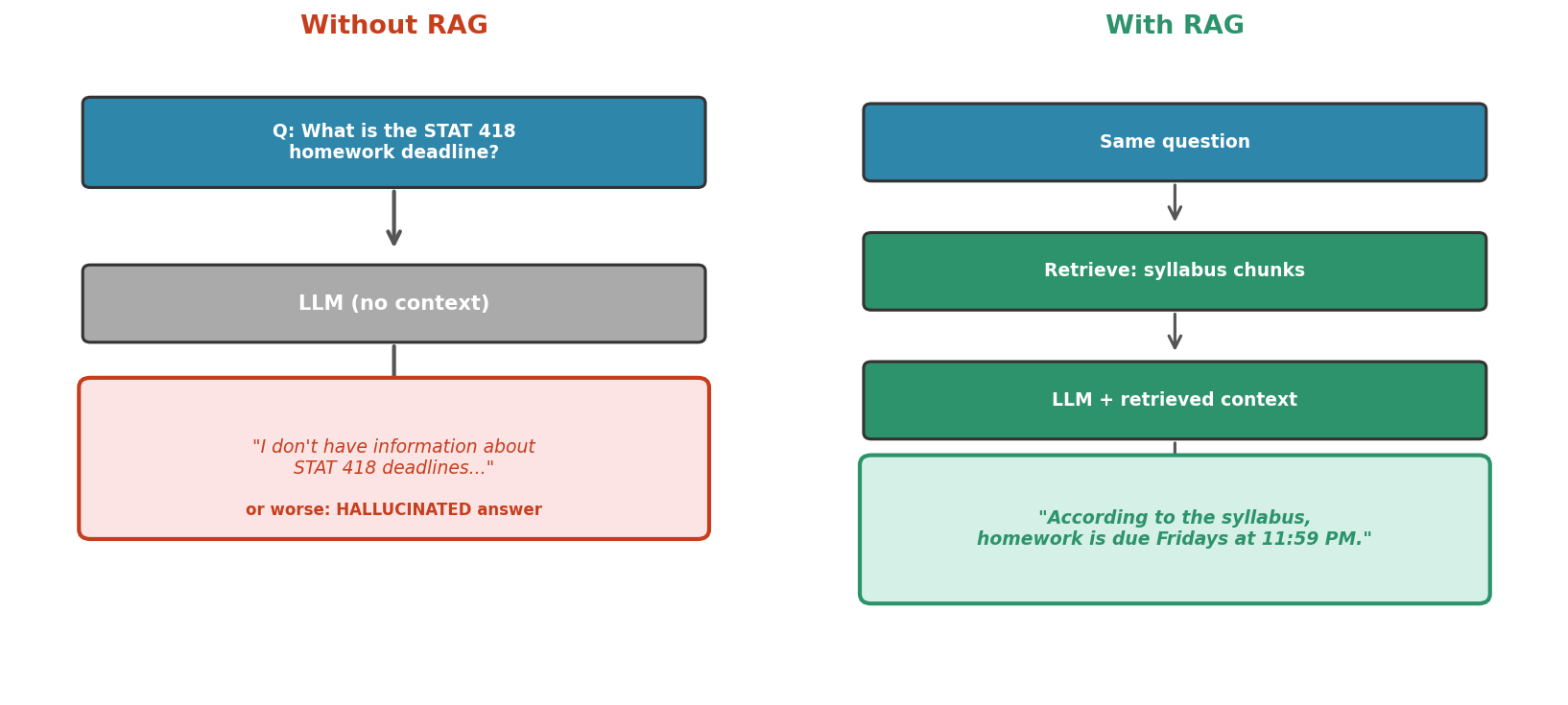
Fig. 231 Figure 6.5.1: Without RAG, the model cannot answer questions about private or recent information—it either refuses or hallucinates. With RAG, the relevant context is retrieved from a knowledge base and included in the prompt, enabling grounded, accurate responses.
The Hallucination Problem
When models lack the information needed to answer a question, they often generate plausible-sounding but incorrect responses—hallucinations. In casual use, this is merely inconvenient. In data science workflows—where we might ask a model to extract information from domain-specific documents—hallucination can introduce systematic errors into our analyses.
RAG mitigates hallucination by providing the model with the actual source material. Instead of “What do you know about X?”, the prompt becomes “Based on the following documents, answer the question about X.” The model’s task shifts from recall to comprehension—a much more reliable capability.
The RAG Solution
RAG combines two capabilities: retrieval (finding relevant documents) and generation (producing a coherent answer from those documents). The pipeline has two phases:
Indexing (offline): Documents are chunked, embedded, and stored in a searchable vector store.
Query (online): The user’s question is embedded, similar chunks are retrieved, and these chunks are included in the prompt sent to the model.
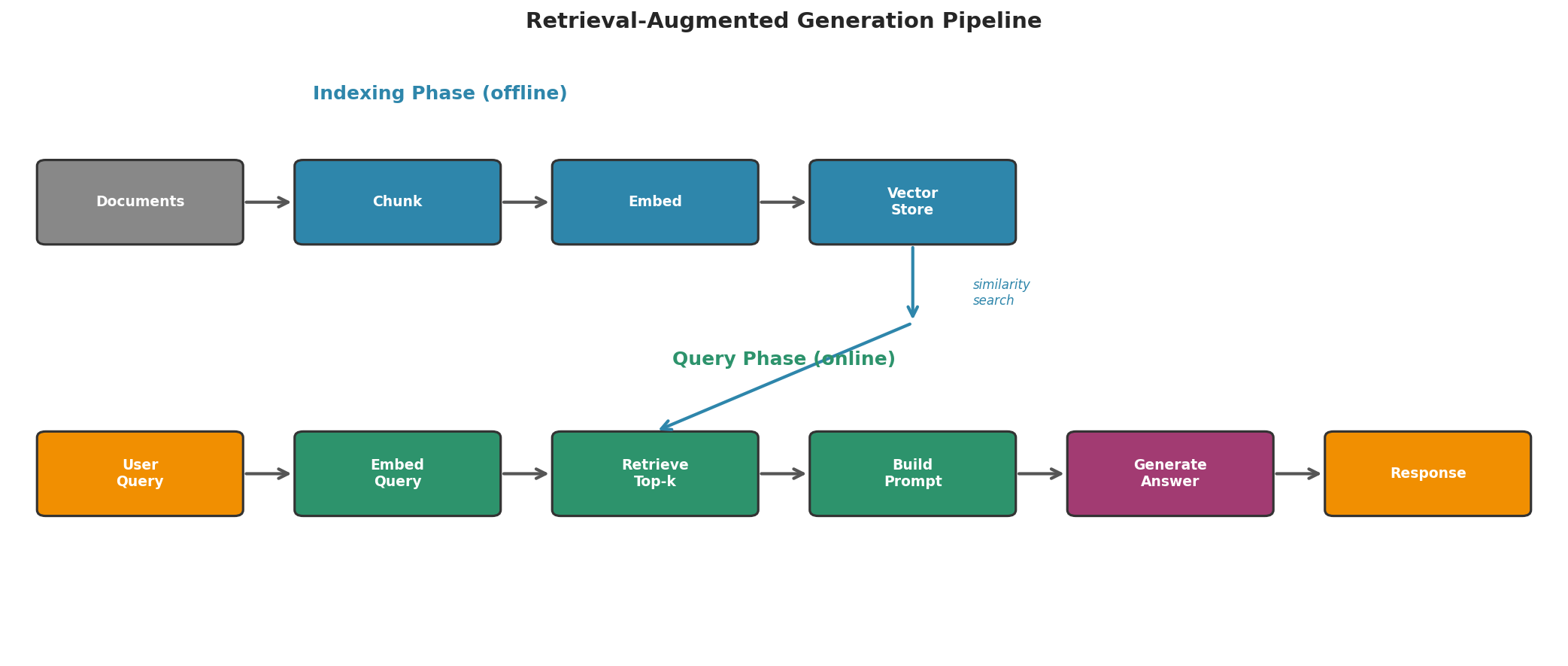
Fig. 232 Figure 6.5.2: The complete RAG pipeline. During indexing, documents are chunked, embedded, and stored. During querying, the user’s question is embedded, similar chunks are retrieved via vector similarity search, and the model generates an answer grounded in the retrieved context.
Building RAG with GenAI Studio
GenAI Studio provides a built-in RAG system through its knowledge base API. This handles chunking, embedding, storage, and retrieval automatically—you upload documents and query against them.
Step 1: Upload Files
Everything begins with getting your documents onto the server. upload_file() returns a FileInfo object whose server-assigned id is how the file is referenced in every later call:
from genai_studio import GenAIStudio
ai = GenAIStudio()
ai.select_model("gemma3:12b")

# Upload a document
file_info = ai.upload_file("course_syllabus.pdf")
print(f"File ID: {file_info.id}")
print(f"Filename: {file_info.filename}")
File ID: abc12345-6789-defg-hijk-lmnopqrstuvw
Filename: course_syllabus.pdf
Step 2: Create a Knowledge Base
# Create a knowledge base
kb = ai.create_knowledge_base(
    name="STAT 418 Course Materials",
    description="Syllabus, lecture notes, and assignments for STAT 418"
)
print(f"Knowledge Base ID: {kb.id}")
print(f"Name: {kb.name}")
Knowledge Base ID: kb-98765432-abcd-efgh-ijkl-mnopqrstuvwx
Name: STAT 418 Course Materials
Step 3: Link Files to the Knowledge Base
Linking a file to the knowledge base is what triggers server-side chunking and embedding—this is the indexing phase of the pipeline:
# Add the uploaded file to the knowledge base
success = ai.add_file_to_knowledge_base(kb.id, file_info.id)
print(f"File linked: {success}")

# You can add multiple files to the same knowledge base
# notes = ai.upload_file("lecture_notes_ch1.pdf")
# ai.add_file_to_knowledge_base(kb.id, notes.id)
File linked: True
Step 4: Query with RAG
Indexing is not instantaneous—after a file is linked, the server needs several seconds to chunk and embed it (the SDK documentation suggests waiting about 10 seconds). Once indexing has settled, pass the knowledge base ID via the collections parameter to any chat method:
import time
time.sleep(10)  # let the server finish indexing the linked file

# Query using RAG — the model retrieves relevant chunks automatically
response = ai.chat(
    "What are the prerequisites for STAT 418?",
    collections=[kb.id]
)
print(response)
According to the course syllabus, the prerequisites for STAT 418 are:
1. STAT 301 or equivalent (Introduction to Statistical Methods)
2. CS 159 or equivalent (Programming fundamentals)
3. Familiarity with Python or R

Students should be comfortable with basic probability, hypothesis
testing, and writing code for data analysis.
Comparing RAG and Non-RAG Responses
The clearest way to see what RAG buys you is a side-by-side comparison on a question the model could not possibly answer from pre-training alone:
question = "What is the late homework policy for STAT 418?"

# Without RAG — model has no course-specific knowledge
response_no_rag = ai.chat(question)
print("WITHOUT RAG:")
print(response_no_rag[:200])

print("\n" + "=" * 50)

# With RAG — model retrieves from course materials
response_rag = ai.chat(question, collections=[kb.id])
print("\nWITH RAG:")
print(response_rag[:200])
WITHOUT RAG:
I don't have specific information about the late homework policy for
STAT 418. You should check the course syllabus or contact the instructor
for the most accurate information about deadlines and late submissions.

==================================================

WITH RAG:
According to the STAT 418 syllabus, the late homework policy is:
- Homework submitted within 24 hours of the deadline receives a 20%
  penalty. Homework submitted more than 24 hours late is not accepted
  without prior arrangement with the instructor.
Building RAG from Scratch
Understanding the mechanics of RAG requires building it manually. This connects directly to the embedding techniques from Section 6.2 and chunking strategies from Section 6.3.
Step 1: Chunk the Documents
def chunk_document(text, chunk_size=200, overlap=30):
    """Chunk a document into overlapping segments."""
    words = text.split()
    chunks = []
    step = chunk_size - overlap
    for i in range(0, len(words), step):
        chunk = " ".join(words[i:i + chunk_size])
        if chunk.strip():
            chunks.append(chunk)
        if i + chunk_size >= len(words):
            break
    return chunks

# Sample knowledge base: statistical methods descriptions
documents = {
    "bootstrap.txt": (
        "The bootstrap is a resampling method introduced by Bradley Efron "
        "in 1979. It estimates the sampling distribution of a statistic by "
        "repeatedly drawing samples with replacement from the observed data. "
        "Given n observations, a bootstrap sample draws n values with "
        "replacement, computes the statistic, and repeats B times. The "
        "resulting B estimates approximate the sampling distribution. "
        "Bootstrap confidence intervals can be constructed using the "
        "percentile method, the basic method, or the bias-corrected and "
        "accelerated (BCa) method. The bootstrap is distribution-free—it "
        "makes no assumptions about the population distribution."
    ),
    "bayesian.txt": (
        "Bayesian inference treats parameters as random variables with "
        "prior distributions that are updated via Bayes' theorem after "
        "observing data. The prior encodes what we believe before seeing "
        "data; the likelihood describes how probable the data is given "
        "the parameters; and the posterior combines both. Markov Chain "
        "Monte Carlo (MCMC) methods, particularly Metropolis-Hastings "
        "and Hamiltonian Monte Carlo (HMC), are used to sample from "
        "posterior distributions when analytical solutions are unavailable. "
        "Bayesian credible intervals have a direct probability "
        "interpretation, unlike frequentist confidence intervals."
    ),
    "cross_validation.txt": (
        "Cross-validation estimates out-of-sample prediction error by "
        "partitioning data into training and validation folds. In k-fold "
        "cross-validation, the data is split into k equally-sized folds. "
        "The model is trained on k-1 folds and evaluated on the held-out "
        "fold, rotating through all k folds. The average error across "
        "folds estimates generalization performance. Leave-one-out "
        "cross-validation (LOOCV) is the special case where k equals n. "
        "Stratified k-fold ensures class proportions are maintained in "
        "each fold, which is important for imbalanced datasets."
    ),
}

# Chunk all documents
all_chunks = []
chunk_sources = []
for filename, content in documents.items():
    chunks = chunk_document(content, chunk_size=50, overlap=10)
    for chunk in chunks:
        all_chunks.append(chunk)
        chunk_sources.append(filename)

print(f"Total documents: {len(documents)}")
print(f"Total chunks: {len(all_chunks)}")
for i, (chunk, source) in enumerate(zip(all_chunks[:3], chunk_sources[:3])):
    print(f"\n  Chunk {i} [{source}]: {chunk[:80]}...")
Total documents: 3
Total chunks: 6

  Chunk 0 [bootstrap.txt]: The bootstrap is a resampling method introduced by Bradley Efron in 1979. It est...
  Chunk 1 [bootstrap.txt]: replacement, computes the statistic, and repeats B times. The resulting B estima...
  Chunk 2 [bayesian.txt]: Bayesian inference treats parameters as random variables with prior distribution...
Step 2: Embed All Chunks
gemma3 (the chat model selected earlier) has no embedding endpoint, so switch to an embed-capable model before embedding. Keep the same embed model across indexing and querying—embedding dimension varies by model, so an index built with one model cannot be searched with another.
import numpy as np

# gemma3 has no embedding endpoint; use an embed-capable model (llama3.2:latest -> 3072-d)
ai.select_model("llama3.2:latest")

# Embed all chunks
chunk_embeddings = ai.embed(all_chunks)
chunk_matrix = np.array(chunk_embeddings)
print(f"Chunk matrix shape: {chunk_matrix.shape}")
Chunk matrix shape: (6, 3072)
Step 3: Retrieve Relevant Chunks
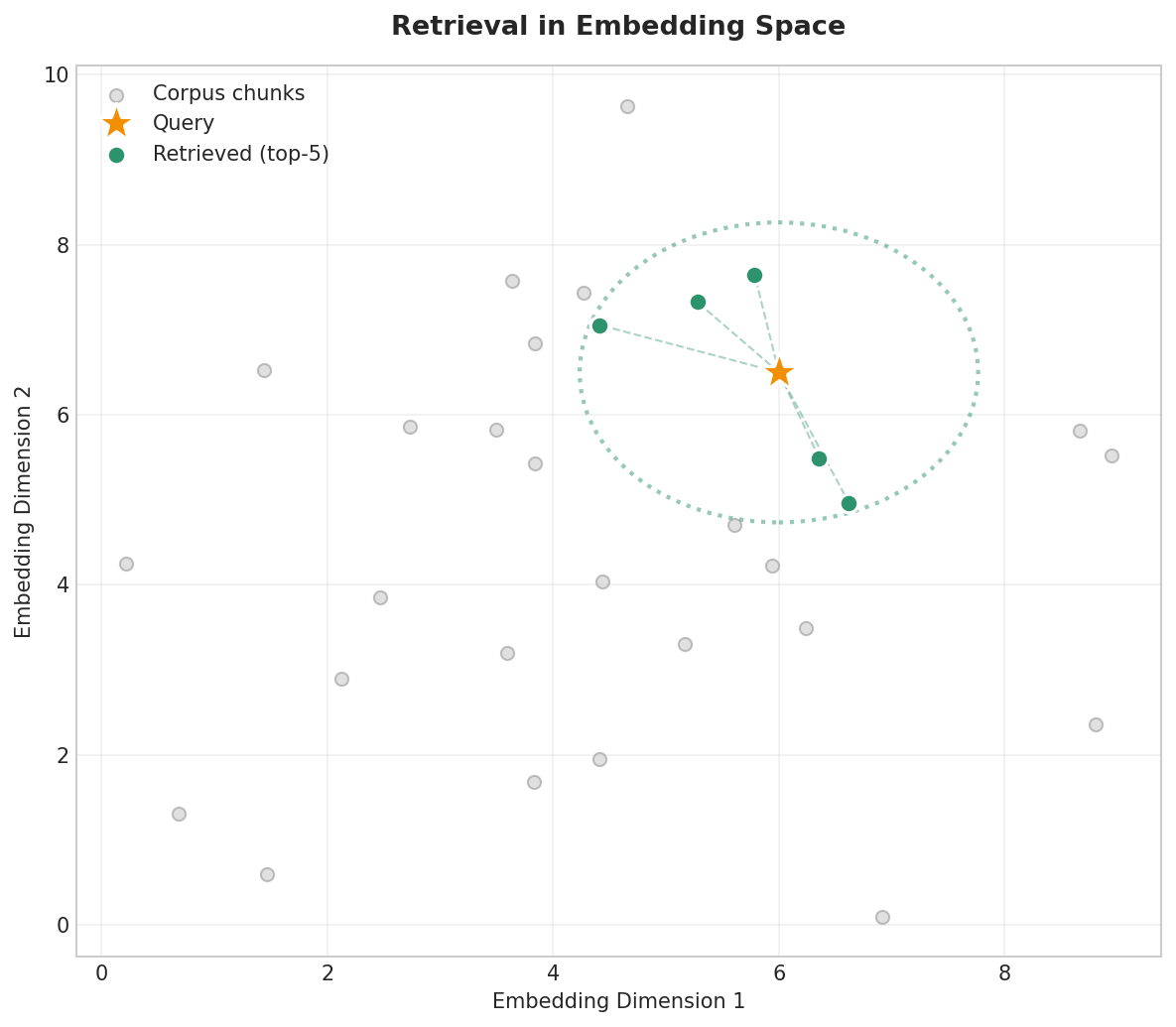
Fig. 233 Figure 6.5.3: Retrieval finds the closest chunks to the query embedding. The query (star) is embedded in the same space as the corpus chunks (dots), and the top-k nearest neighbors (green) are selected.
def retrieve(query, chunk_matrix, all_chunks, chunk_sources, ai, top_k=3):
    """Retrieve the top-k most similar chunks to the query."""
    query_embedding = ai.embed(query)
    similarities = [
        GenAIStudio.cosine_similarity(query_embedding, chunk_emb)
        for chunk_emb in chunk_matrix
    ]
    ranked_indices = np.argsort(similarities)[::-1][:top_k]

    results = []
    for idx in ranked_indices:
        results.append({
            "chunk": all_chunks[idx],
            "source": chunk_sources[idx],
            "similarity": similarities[idx],
        })
    return results

query = "How do I construct a confidence interval without assumptions?"
retrieved = retrieve(query, chunk_matrix, all_chunks, chunk_sources, ai)

print(f"Query: '{query}'")
print(f"\nRetrieved {len(retrieved)} chunks:")
for r in retrieved:
    print(f"  [{r['similarity']:.4f}] [{r['source']}] {r['chunk'][:70]}...")
Query: 'How do I construct a confidence interval without assumptions?'

Retrieved 3 chunks:
  [0.7845] [bootstrap.txt] The bootstrap is a resampling method introduced by Bradley Efron in 1979...
  [0.7234] [bootstrap.txt] replacement, computes the statistic, and repeats B times. The resultin...
  [0.6567] [bayesian.txt] Bayesian inference treats parameters as random variables with prior distr...
Step 4: Build the Augmented Prompt
The retrieved chunks now become context in a structured prompt that instructs the model to answer only from the provided material:
def build_rag_prompt(query, retrieved_chunks):
    """Construct a prompt that includes retrieved context."""
    context = "\n\n".join([
        f"[Source: {r['source']}]\n{r['chunk']}"
        for r in retrieved_chunks
    ])

    prompt = f"""Answer the following question based ONLY on the provided context.
If the context does not contain the answer, say "I cannot answer this based on
the provided documents."

### Context ###
{context}
### End Context ###

Question: {query}

Answer:"""
    return prompt

rag_prompt = build_rag_prompt(query, retrieved)
# Generate with the chat model; llama3.2:latest stays selected for embeddings
response = ai.chat(rag_prompt, model="gemma3:12b")
print(response)
Based on the provided documents, you can construct confidence intervals
without distributional assumptions using the bootstrap method. The bootstrap
is distribution-free—it makes no assumptions about the population
distribution. To construct a bootstrap confidence interval:

1. Draw B bootstrap samples (typically B = 1,000 or more) by sampling
   n observations with replacement from your data.
2. Compute your statistic of interest on each bootstrap sample.
3. Use the resulting B estimates to form the interval via:
   - The percentile method (use the 2.5th and 97.5th percentiles)
   - The basic method
   - The bias-corrected and accelerated (BCa) method
The model correctly grounds its answer in the retrieved bootstrap content and cites the specific methods mentioned in the source material.
Complete Manual RAG Pipeline
Putting it all together into a reusable pipeline:
class SimpleRAG:
    """Minimal RAG pipeline built on GenAI Studio embeddings."""

    def __init__(self, ai):
        self.ai = ai
        self.chunks = []
        self.sources = []
        self.embeddings = None

    def add_document(self, text, source="unknown", chunk_size=100, overlap=15):
        """Add a document to the index."""
        new_chunks = chunk_document(text, chunk_size, overlap)
        self.chunks.extend(new_chunks)
        self.sources.extend([source] * len(new_chunks))

    def build_index(self):
        """Embed all chunks."""
        self.embeddings = np.array(self.ai.embed(self.chunks))
        print(f"Indexed {len(self.chunks)} chunks "
              f"({self.embeddings.shape[1]} dimensions)")

    def query(self, question, top_k=3):
        """Retrieve relevant chunks and generate an answer."""
        retrieved = retrieve(question, self.embeddings, self.chunks,
                             self.sources, self.ai, top_k)
        prompt = build_rag_prompt(question, retrieved)
        answer = self.ai.chat(prompt, model="gemma3:12b")  # generation uses the chat model
        return {"answer": answer, "sources": retrieved}

# Usage — same chunking as before, so we rebuild the same 6-chunk index
rag = SimpleRAG(ai)
for name, content in documents.items():
    rag.add_document(content, source=name, chunk_size=50, overlap=10)
rag.build_index()

result = rag.query("What is MCMC used for?")
print(result["answer"][:200])
print(f"\nSources used: {[r['source'] for r in result['sources']]}")
Indexed 6 chunks (3072 dimensions)
Based on the provided context, MCMC (Markov Chain Monte Carlo) methods
are used to sample from posterior distributions when analytical solutions
are unavailable. Specifically, Metropolis-Hastings and Hamiltonian Monte...

Sources used: ['bayesian.txt', 'bayesian.txt', 'cross_validation.txt']
Chunking Strategies for RAG
The choice of chunk size significantly affects RAG quality. Small chunks are more precise but may lack context; large chunks provide more context but dilute the signal.
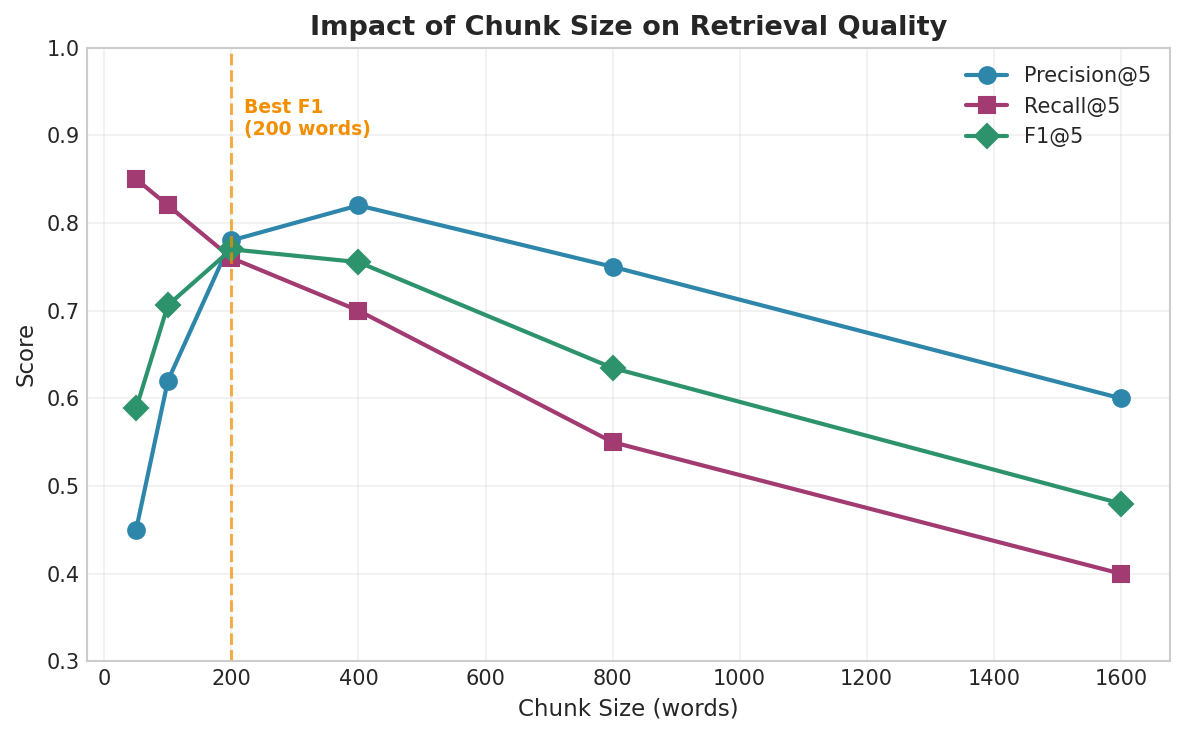
Fig. 234 Figure 6.5.4: Chunk size affects the precision-recall trade-off. Small chunks give high recall (many potentially relevant pieces retrieved) but low precision (each piece may lack context). Large chunks have higher precision per chunk but lower recall because fewer distinct concepts are indexed.
# Compare retrieval quality across chunk sizes
question = "How does the bootstrap construct confidence intervals?"

for chunk_size in [30, 75, 150]:
    rag_test = SimpleRAG(ai)
    for name, content in documents.items():
        rag_test.add_document(content, source=name, chunk_size=chunk_size)
    rag_test.build_index()

    result = rag_test.query(question, top_k=3)
    sources = [r['source'] for r in result['sources']]
    sims = [r['similarity'] for r in result['sources']]
    print(f"\nChunk size={chunk_size}: {len(rag_test.chunks)} chunks, "
          f"top sim={max(sims):.4f}, sources={sources}")
Chunk size=30: 15 chunks, top sim=0.8123, sources=['bootstrap.txt', 'bootstrap.txt', 'bootstrap.txt']
Chunk size=75: 6 chunks, top sim=0.7845, sources=['bootstrap.txt', 'bootstrap.txt', 'bayesian.txt']
Chunk size=150: 3 chunks, top sim=0.7234, sources=['bootstrap.txt', 'bayesian.txt', 'cross_validation.txt']
With smaller chunks (30 words), all retrieved chunks come from the correct source (bootstrap.txt) and the similarity is highest. With larger chunks (150 words), the retrieval is less focused. The optimal chunk size depends on your documents and query types—there is no universal best value.
Evaluating RAG Systems
RAG systems have two components to evaluate: retrieval quality (did we find the right chunks?) and generation quality (did the model produce a correct answer from those chunks?).
Retrieval Metrics
Retrieval quality is measured with classic information-retrieval metrics. Precision@k asks: of the k chunks we retrieved, how many came from a relevant source? Recall@k asks: of the relevant sources, how many did we actually find?
def evaluate_retrieval(queries, expected_sources, rag_system, top_k=3):
    """Evaluate retrieval quality with Precision@k and Recall@k."""
    precisions = []
    recalls = []

    for query, expected in zip(queries, expected_sources):
        result = rag_system.query(query, top_k=top_k)
        retrieved_sources = [r['source'] for r in result['sources']]

        relevant_retrieved = sum(1 for s in retrieved_sources if s in expected)
        precision = relevant_retrieved / len(retrieved_sources)
        sources_found = len(set(retrieved_sources) & set(expected))
        recall = sources_found / len(expected) if expected else 0

        precisions.append(precision)
        recalls.append(recall)

    return {
        "mean_precision": np.mean(precisions),
        "mean_recall": np.mean(recalls),
        "mean_f1": 2 * np.mean(precisions) * np.mean(recalls) /
                   (np.mean(precisions) + np.mean(recalls) + 1e-10),
    }

# Test retrieval
test_queries = [
    "How does bootstrap resampling work?",
    "What is a prior distribution?",
    "How many folds in cross-validation?",
]
expected = [
    ["bootstrap.txt"],
    ["bayesian.txt"],
    ["cross_validation.txt"],
]

metrics = evaluate_retrieval(test_queries, expected, rag)
print(f"Precision@3: {metrics['mean_precision']:.3f}")
print(f"Recall@3:    {metrics['mean_recall']:.3f}")
print(f"F1@3:        {metrics['mean_f1']:.3f}")
Precision@3: 0.778
Recall@3:    1.000
F1@3:        0.875
Faithfulness Verification
A faithful RAG answer only states things supported by the retrieved context. We can check faithfulness by asking a judge model to verify claims against the source material:
def check_faithfulness(answer, context, ai):
    """Use an LLM to check whether the answer is faithful to the context."""
    prompt = f"""You are a fact-checking assistant. Given a context and an answer,
determine whether every claim in the answer is supported by the context.

### Context ###
{context}
### End Context ###

### Answer to Check ###
{answer}
### End Answer ###

Respond with ONLY one of:
- FAITHFUL: All claims are supported by the context
- PARTIALLY_FAITHFUL: Some claims are supported, some are not
- UNFAITHFUL: The answer contains claims not in the context

Verdict:"""

    verdict = ai.chat(prompt, model="gemma3:12b").strip().upper()
    return verdict

result = rag.query("What is the bootstrap?")
context = "\n".join([r['chunk'] for r in result['sources']])
verdict = check_faithfulness(result['answer'], context, ai)
print(f"Faithfulness: {verdict}")
Faithfulness: FAITHFUL
RAG Failure Modes and Mitigations
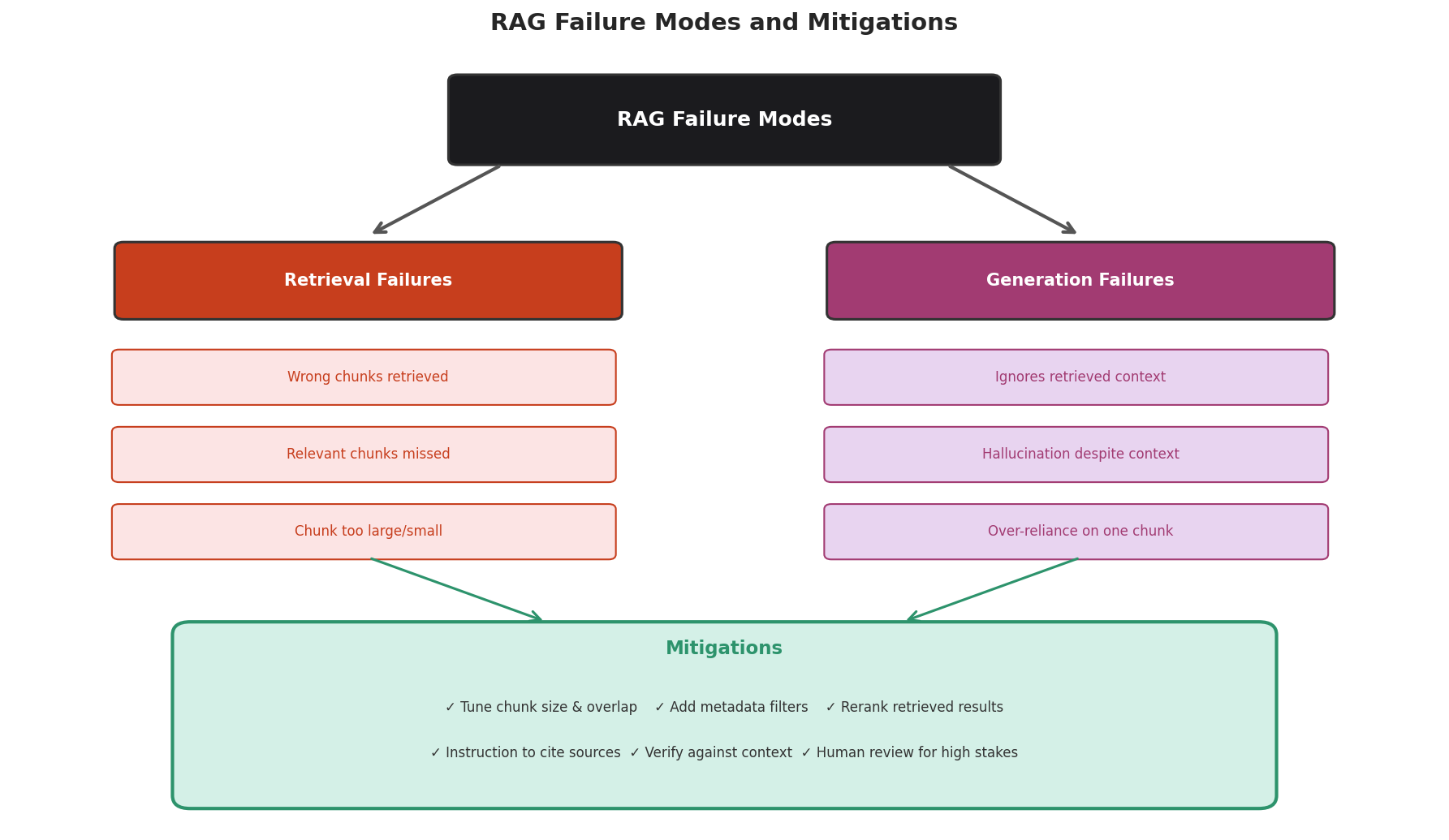
Fig. 235 Figure 6.5.5: RAG failures fall into two categories: retrieval failures (wrong or missing chunks) and generation failures (model ignores or misinterprets the context). Each has specific mitigations.
Retrieval Failures
Wrong chunks retrieved: The embedding similarity favors surface-level similarity over semantic relevance. Mitigation: add metadata filters, use hybrid search (keyword + semantic).
Relevant chunks missed: The query phrasing doesn’t match how the information is expressed in the documents. Mitigation: try query expansion (rephrase the query multiple ways), increase top-k.
Chunk too large or too small: See the chunk size analysis above. Mitigation: experiment with chunk sizes; use overlap to reduce boundary effects.
Generation Failures
Model ignores retrieved context: Particularly common with short context or when the model’s pre-training knowledge conflicts. Mitigation: add explicit instructions (“Answer ONLY based on the provided context”).
Hallucination despite context: The model fills in gaps in the retrieved context with fabricated details. Mitigation: ask the model to cite specific sources; use faithfulness verification.
Over-reliance on one chunk: The model bases its entire answer on the first retrieved chunk, ignoring others. Mitigation: restructure the prompt to emphasize all chunks equally.
A Statistical Perspective on RAG
RAG can be viewed through a bias-variance lens. Without RAG, the model has high bias (it cannot access the correct information) but low variance (its answers are stable). With RAG, bias decreases (the correct information is available) but variance may increase (different retrieved chunks for slightly different queries can change the answer). The quality of the retrieval step determines where this trade-off lands.
Chapter 6.5 Exercises: Retrieval-Augmented Generation
Exercise 6.5.1 — Course FAQ Bot
Create a small knowledge base from a course FAQ or syllabus (use 3–5 pages of text). Upload it to GenAI Studio using
upload_file()andcreate_knowledge_base().Write 10 questions that a student might ask about the course. Query each with and without RAG.
For each question, rate the response quality: (1) correct and grounded, (2) partially correct, (3) incorrect or hallucinated. Compare the rating distributions for RAG vs. non-RAG.
Solution
# Step 1: Create KB
file_info = ai.upload_file("stat418_syllabus.pdf")
kb = ai.create_knowledge_base("STAT 418 FAQ", "Course syllabus")
ai.add_file_to_knowledge_base(kb.id, file_info.id)
import time; time.sleep(10)  # wait for server-side indexing

# Step 2: Test questions
questions = [
    "What are the prerequisites?",
    "When is the final exam?",
    "What is the late policy?",
    "How is the grade calculated?",
    "What textbook is required?",
    "Are there office hours?",
    "Is attendance mandatory?",
    "Can I use AI on homework?",
    "How many assignments are there?",
    "What programming language is used?",
]

for q in questions:
    no_rag = ai.chat(q)
    with_rag = ai.chat(q, collections=[kb.id])
    print(f"Q: {q}")
    print(f"  No RAG: {no_rag[:100]}...")
    print(f"  RAG:    {with_rag[:100]}...")
    print()
Exercise 6.5.2 — Manual RAG Pipeline
Build a manual RAG pipeline (without using GenAI Studio’s knowledge base API) using the
SimpleRAGclass from this section. Index 3–5 text documents on a topic of your choice.Test the pipeline with 5 queries. For each, verify that the retrieved chunks are relevant and the generated answer is grounded.
Add a
retrieve_with_scores()method that returns similarity scores. Plot the score distribution for a correct query vs. an off-topic query.
Solution
import numpy as np

ai.select_model("llama3.2:latest")  # embed-capable model for indexing and queries
rag = SimpleRAG(ai)

# Add your own documents
rag.add_document(
    "Linear regression models the relationship between a dependent "
    "variable and one or more independent variables using a linear "
    "equation. The coefficients are estimated by ordinary least "
    "squares, minimizing the sum of squared residuals.",
    source="linear_regression.txt"
)
rag.add_document(
    "Logistic regression models binary outcomes using the logistic "
    "function. The coefficients represent log-odds ratios. Maximum "
    "likelihood estimation is used instead of OLS.",
    source="logistic_regression.txt"
)
rag.add_document(
    "Decision trees partition the feature space into rectangular "
    "regions by recursive binary splitting. They are interpretable "
    "but prone to overfitting without pruning or ensemble methods.",
    source="decision_trees.txt"
)

rag.build_index()

# Test queries
for q in ["What is OLS?", "How do decision trees work?",
           "What is the weather today?"]:
    result = rag.query(q)
    sims = [r['similarity'] for r in result['sources']]
    print(f"Q: {q}")
    print(f"  Top similarity: {max(sims):.4f}")
    print(f"  Answer: {result['answer'][:100]}...")
    print()
Exercise 6.5.3 — Chunk Size Experiment
Choose a single long document (500+ words). Index it with chunk sizes of 30, 50, 100, 200, and 400 words (with 10% overlap for each).
For each chunk size, query the pipeline with 5 questions and record the top-3 similarity scores and the source files of retrieved chunks.
Plot: (1) average top-1 similarity vs. chunk size, (2) number of chunks vs. chunk size. Identify the chunk size that best balances retrieval precision and context completeness.
Solution
import numpy as np
import matplotlib.pyplot as plt

document = " ".join([
    "The bootstrap resamples data with replacement. " * 10,
    "Cross-validation partitions data into folds. " * 10,
    "Bayesian inference updates priors with data. " * 10,
])

queries = [
    "How does bootstrap work?",
    "What is cross-validation?",
    "Explain Bayesian inference.",
    "How to estimate uncertainty?",
    "Compare resampling methods.",
]

chunk_sizes = [30, 50, 100, 200, 400]
results = []

for cs in chunk_sizes:
    test_rag = SimpleRAG(ai)
    test_rag.add_document(document, source="methods.txt", chunk_size=cs)
    test_rag.build_index()

    top_sims = []
    for q in queries:
        result = test_rag.query(q, top_k=3)
        top_sims.append(result['sources'][0]['similarity'])

    results.append({
        'chunk_size': cs,
        'n_chunks': len(test_rag.chunks),
        'avg_top_sim': np.mean(top_sims),
    })
    print(f"Chunk size={cs}: {len(test_rag.chunks)} chunks, "
          f"avg top-1 sim={np.mean(top_sims):.4f}")
Exercise 6.5.4 — RAG Failure Analysis
Deliberately construct scenarios that cause each type of RAG failure:
Retrieval failure: Ask a question using very different vocabulary than the indexed documents.
Generation failure: Provide a question where the retrieved context is tangentially related but doesn’t contain the answer.
For each failure, diagnose what went wrong and propose a mitigation.
Implement one mitigation (e.g., query expansion: rephrase the query 3 ways and merge retrieved results) and show that it improves the response.
Solution
# Retrieval failure: vocabulary mismatch
rag = SimpleRAG(ai)
rag.add_document(
    "The bootstrap method resamples observations with replacement "
    "to approximate the sampling distribution of a statistic.",
    source="bootstrap.txt"
)
rag.build_index()

# This uses different vocabulary
result = rag.query("How can I compute error bars for my estimate?")
print(f"Top similarity: {result['sources'][0]['similarity']:.4f}")
print(f"Answer: {result['answer'][:150]}...")

# Mitigation: query expansion
def query_with_expansion(question, rag, ai, top_k=3):
    expansions_prompt = f"""Rephrase this question 3 different ways,
using different vocabulary each time. Return only the 3 rephrased questions,
one per line.

Question: {question}"""
    expansions = ai.chat(expansions_prompt).strip().split('\n')
    all_queries = [question] + [e.strip() for e in expansions if e.strip()]

    all_retrieved = []
    seen_chunks = set()
    for q in all_queries[:4]:
        result = rag.query(q, top_k=top_k)
        for r in result['sources']:
            if r['chunk'] not in seen_chunks:
                all_retrieved.append(r)
                seen_chunks.add(r['chunk'])

    all_retrieved.sort(key=lambda x: x['similarity'], reverse=True)
    prompt = build_rag_prompt(question, all_retrieved[:top_k])
    return ai.chat(prompt)

improved = query_with_expansion(
    "How can I compute error bars for my estimate?", rag, ai
)
print(f"\nWith query expansion:\n{improved[:200]}...")
Transition to What Follows
RAG grounds LLM responses in source documents, but its quality—like that of the annotation pipelines from Section 6.4—ultimately depends on how well we communicate with the model. In Section 6.6, we develop systematic techniques for designing effective prompts, putting the templates we have written by intuition so far on a principled, testable footing.
Key Takeaways
Key Takeaways 📝
RAG grounds LLM responses in external documents, reducing hallucination and enabling domain-specific answers without fine-tuning.
GenAI Studio provides built-in RAG through
upload_file(),create_knowledge_base(),add_file_to_knowledge_base(), andcollections=[kb_id]in chat calls.Manual RAG follows a clear pipeline: chunk documents → embed chunks → store vectors → embed query → retrieve top-k similar chunks → build augmented prompt → generate answer.
Chunk size is the most important tuning parameter — it controls the precision-recall trade-off. Smaller chunks are more precise; larger chunks provide more context. Experiment to find the right balance.
Evaluate both retrieval and generation — Precision@k and Recall@k measure retrieval; faithfulness verification and ground-truth comparison measure generation quality.