Section 6.6 Prompt Engineering for Data Science
In traditional programming, we write explicit instructions that a computer executes deterministically. We specify data types, control flow, and exact operations. With large language models, the “program” is a natural language description of what we want—a prompt. The model interprets this description and produces an output. There is no compiler to catch errors, no type system to enforce constraints, and no guarantee of deterministic behavior. Yet the prompt is the single most important factor determining the quality of an LLM’s output.
Prompt engineering is the systematic practice of designing prompts that reliably produce useful outputs. It is not a dark art or a collection of tricks—it is a discipline with principles, patterns, and best practices that can be studied and applied methodically. For data scientists, effective prompting transforms LLMs from impressive but unpredictable tools into reliable components of analytical workflows.
This section develops prompt engineering from first principles. We begin by treating prompts as code—artifacts that deserve version control, testing, and iteration. We then build up a toolkit of techniques: structured instructions, few-shot examples, chain-of-thought reasoning, and self-consistency. Throughout, we connect these techniques to statistical concepts from earlier chapters and focus on data science applications.
Road Map 🧭
Treat prompts as code: version-controlled, tested, and reproducible
Design systematic prompts with clear instructions, role specification, and output formatting
Apply few-shot prompting to guide model behavior through examples
Implement chain-of-thought reasoning for multi-step analytical problems
Use self-consistency to improve reliability through multiple reasoning paths—a technique analogous to bootstrap resampling
Debug prompt failures through systematic iteration and A/B testing
Prompts as Code
A common mistake is treating prompts as casual text—something typed quickly into a chat interface and discarded. In data science workflows, prompts should be treated with the same rigor as any other code artifact.
The Prompt Is the Program
When you use an LLM to annotate 10,000 customer reviews, the prompt is your classification algorithm. When you use it to extract entities from medical records, the prompt is your NER system. The quality of your results depends entirely on the quality of this “program.”
This perspective has practical consequences:
Version control: Store prompts in your codebase alongside your analysis scripts. When you modify a prompt, commit the change with a message explaining why.
Parameterization: Write prompt templates with placeholders rather than hardcoding specific values.
Testing: Before deploying a prompt at scale, test it on a representative sample and measure performance.
Documentation: Record what each prompt is designed to do, what models it was tested with, and what performance you observed.
from genai_studio import GenAIStudio
ai = GenAIStudio()
ai.select_model("gemma3:12b")

# BAD: Ad-hoc prompt, no structure
result_bad = ai.chat("classify this: great product love it")

# GOOD: Parameterized prompt template
SENTIMENT_TEMPLATE = """Classify the sentiment of the following text.
Respond with exactly one word: positive, negative, or neutral.

Text: {text}
Sentiment:"""

def classify_sentiment(text):
    prompt = SENTIMENT_TEMPLATE.format(text=text)
    return ai.chat(prompt).strip().lower()

result_good = classify_sentiment("Great product, love it!")
print(f"Sentiment: {result_good}")
Sentiment: positive
Version Control, Reproducibility, and Testing
Prompt templates should live in your project repository, not in notebooks or chat histories. A practical pattern is to define templates as module-level constants or load them from dedicated files:
PROMPTS = {
    "sentiment": {
        "version": "1.2",
        "template": (
            "Classify the sentiment of the following text.\n"
            "Respond with exactly one word: positive, negative, or neutral.\n\n"
            "Text: {text}\n"
            "Sentiment:"
        ),
        "model": "gemma3:12b",
        "notes": "v1.2: Added 'exactly one word' constraint to reduce verbose responses"
    },
    "entity_extraction": {
        "version": "1.0",
        "template": (
            "Extract all person names, organizations, and locations from "
            "the following text. Return the result as JSON with keys "
            "'persons', 'organizations', 'locations', each mapping to a "
            "list of strings.\n\nText: {text}\n\nJSON:"
        ),
        "model": "gemma3:12b",
        "notes": "v1.0: Initial version"
    }
}

prompt_config = PROMPTS["sentiment"]
result = ai.chat(prompt_config["template"].format(text="The service was terrible."))
print(f"[{prompt_config['version']}] Result: {result.strip()}")
[1.2] Result: negative
Systematic Prompt Design
Effective prompts share common structural elements. Understanding these elements helps you write reliable prompts from the start, rather than iterating through trial and error.
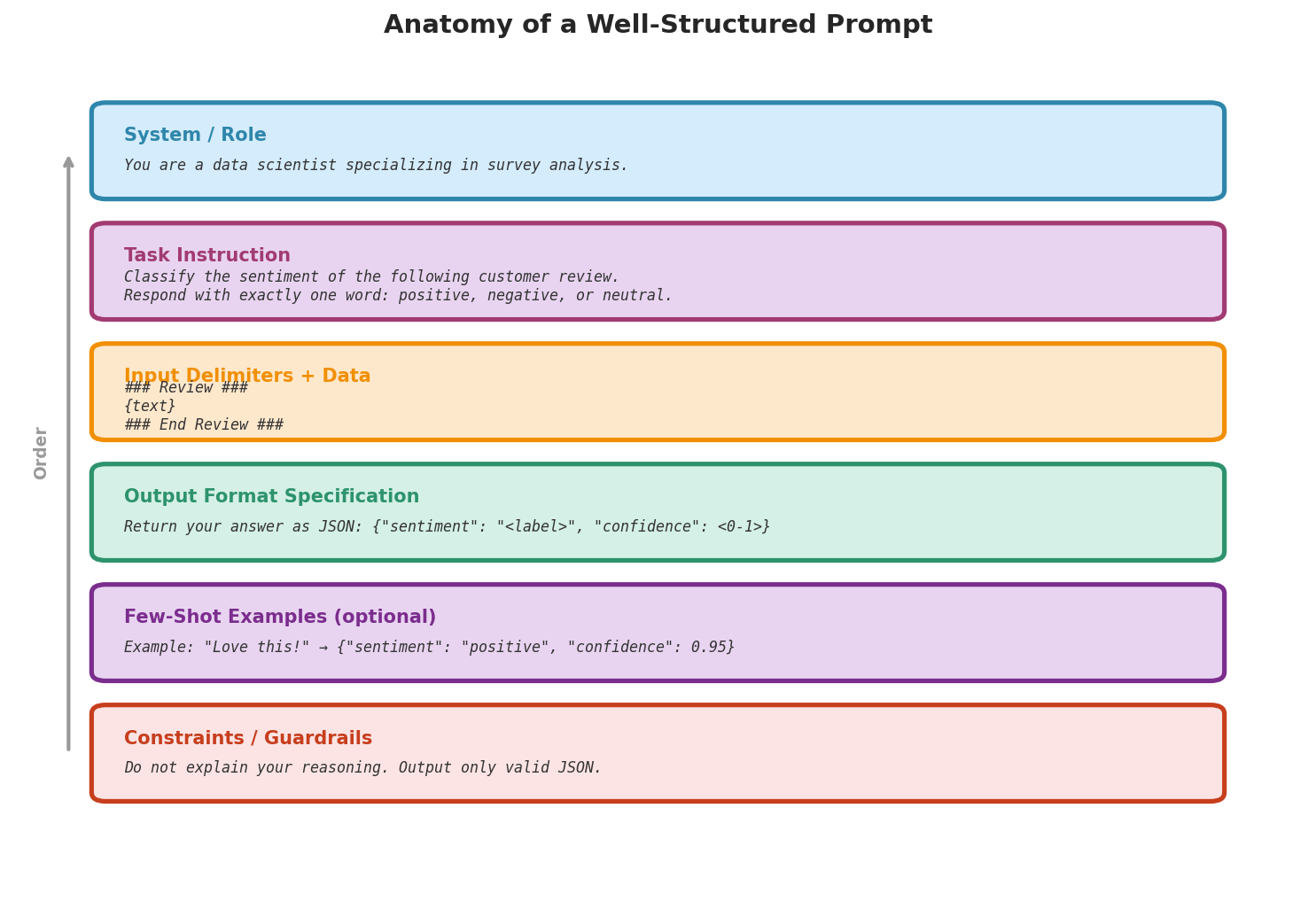
Fig. 236 Figure 6.6.1: Anatomy of a well-structured prompt. Each component serves a distinct purpose: role/system context sets the model’s expertise, task instructions define the objective, delimiters isolate the input data, format specifications constrain the output structure, examples demonstrate the desired behavior, and guardrails prevent common failure modes.
Clear Instructions and Role Specification
The most common source of prompt failure is ambiguity. Compare:
# Ambiguous
vague = ai.chat("Tell me about regression")
print(f"Vague ({len(vague.split())} words): {vague[:100]}...")

# Specific
specific = ai.chat(
    "Explain the difference between L1 and L2 regularization in "
    "linear regression. Cover: (1) the penalty term each adds, "
    "(2) the effect on coefficients, and (3) when to use each. "
    "Keep your answer under 150 words."
)
print(f"\nSpecific ({len(specific.split())} words): {specific[:200]}...")
Vague (287 words): Regression is a statistical method used to examine
the relationship between...

Specific (142 words): L1 regularization (Lasso) adds λΣ|βⱼ| to the
loss function, while L2 regularization (Ridge) adds λΣβⱼ². L1 drives
some coefficients exactly to zero, performing feature selection. L2
shrinks all coefficients toward zero but rarely eliminates them...
Role specification via system messages (introduced in Section 6.1) is a powerful tool for controlling output style. A system message sets the model’s persona and behavioral constraints for the entire conversation.
Delimiters, Structure, and Formatting
When prompts contain both instructions and data, clear separation prevents the model from confusing one for the other. This is especially important when processing user-provided text that might contain instruction-like content:
text_to_analyze = """The company reported strong Q3 earnings, beating
analyst expectations by 15%. However, forward guidance was cautious
due to supply chain uncertainties."""

# Use XML-style delimiters to separate instructions from data
prompt = f"""Analyze the following financial text for sentiment.

<text>
{text_to_analyze}
</text>

Provide your analysis in the following format:
Overall sentiment: [positive/negative/mixed]
Key positive signals: [list]
Key negative signals: [list]
Rationale: [one sentence]"""

response = ai.chat(prompt)
print(response)
Overall sentiment: mixed
Key positive signals: strong Q3 earnings, beat analyst expectations by 15%
Key negative signals: cautious forward guidance, supply chain uncertainties
Rationale: strong current results are offset by cautious forward guidance, so the overall tone is mixed
Output Format Specification
For programmatic use, you need outputs that can be parsed reliably. Specifying the exact output format—JSON, CSV, or a rigid template—dramatically improves parsability:
import json

prompt = """Extract structured information from this research abstract.

<abstract>
We conducted a randomized controlled trial with 500 participants to
evaluate the effectiveness of a new teaching method. The treatment
group (n=250) showed a mean improvement of 12.3 points (SD=4.1)
compared to 8.7 points (SD=3.8) in the control group. The difference
was statistically significant (t=10.4, p<0.001, Cohen's d=0.93).
</abstract>

Return ONLY a JSON object with these fields:
- study_type: string
- sample_size: integer
- treatment_effect: number
- control_effect: number
- p_value: string
- effect_size: number
- significant: boolean"""

response = ai.chat(prompt)
print("Raw response:")
print(response)

# Parse JSON (strip markdown code fences if present)
json_str = response.strip()
if json_str.startswith("```"):
    json_str = json_str.split("\n", 1)[1].rsplit("```", 1)[0]
data = json.loads(json_str)
print(f"\nParsed: effect size = {data['effect_size']}, "
      f"significant = {data['significant']}")
Raw response:
```json
{
  "study_type": "randomized controlled trial",
  "sample_size": 500,
  "treatment_effect": 12.3,
  "control_effect": 8.7,
  "p_value": "<0.001",
  "effect_size": 0.93,
  "significant": true
}
```

Parsed: effect size = 0.93, significant = True
Pitfall: JSON Parsing
Models often wrap JSON responses in markdown code fences (``json ... ``). Always strip these before parsing. Additionally, models sometimes produce invalid JSON (trailing commas, unquoted keys). For production pipelines, use a lenient JSON parser or add retry logic.
Few-Shot Prompting
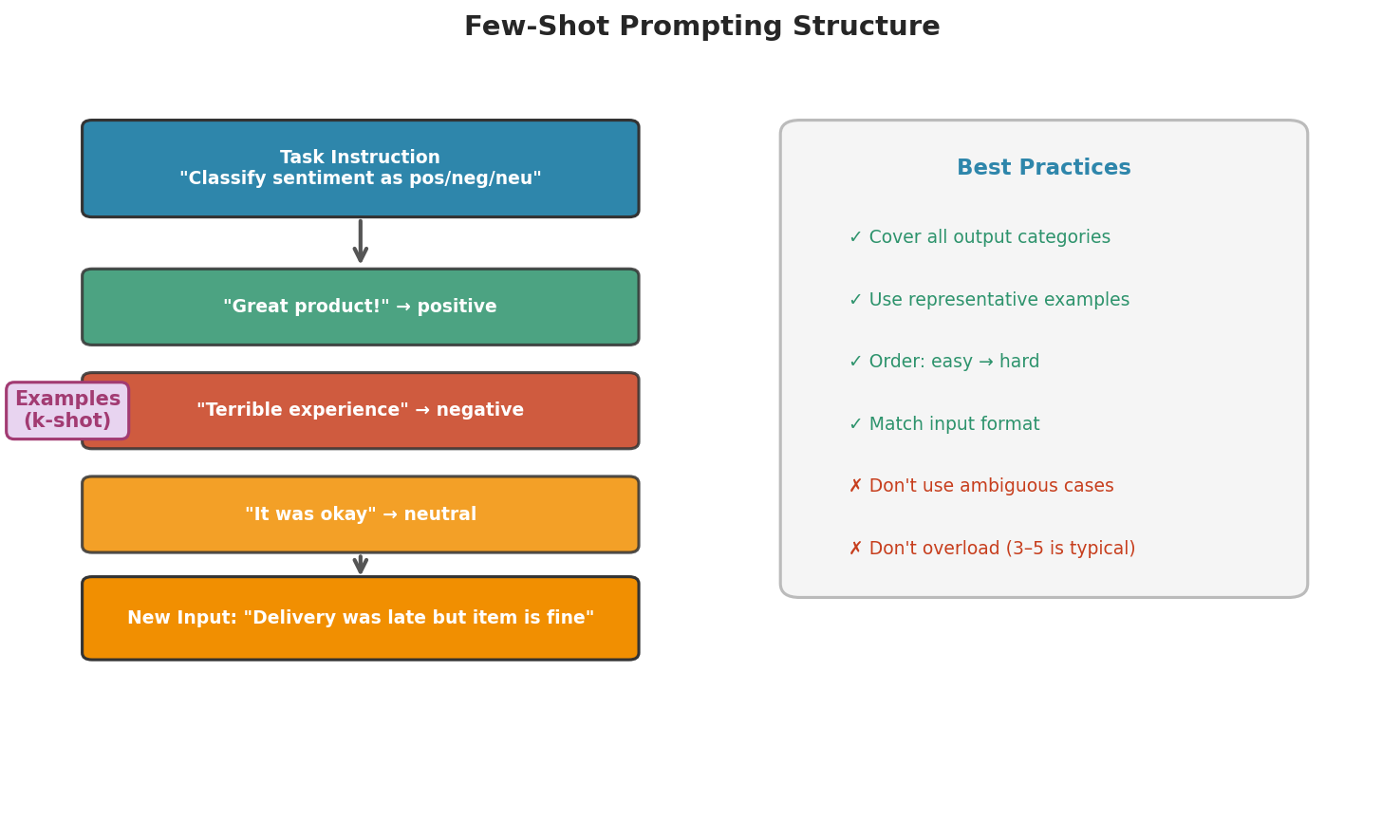
Fig. 237 Figure 6.6.2: The structure of a few-shot prompt. Task instructions are followed by labeled examples that cover the range of expected outputs, then the new input. Example selection and ordering significantly affect performance.
Few-shot prompting provides examples of the desired input-output behavior directly in the prompt. The model uses these examples to infer the pattern and apply it to new inputs.
Example Selection and Ordering
The examples you choose matter. Good examples:
Cover the range of expected inputs (not all the same type)
Demonstrate edge cases that might otherwise be handled incorrectly
Show the exact output format you want
prompt = """Classify each research method as quantitative, qualitative,
or mixed methods.

Example 1:
Method: Survey with Likert-scale responses analyzed using factor analysis
Classification: quantitative

Example 2:
Method: Semi-structured interviews analyzed with thematic coding
Classification: qualitative

Example 3:
Method: Survey with open-ended responses, analyzed with both regression
and content analysis
Classification: mixed methods

Now classify:
Method: Randomized controlled trial with 200 participants measuring
blood pressure changes
Classification:"""

response = ai.chat(prompt)
print(f"Classification: {response.strip()}")
Classification: quantitative
When Few-Shot Helps and When It Does Not
Few-shot prompting works well when:
The task has a clear input-output mapping (classification, extraction, formatting)
The desired output format is non-obvious without examples
The task requires domain-specific conventions
Few-shot prompting helps less when:
The task requires genuine reasoning (examples show answers but not reasoning steps)
The examples are too similar (the model memorizes the pattern without understanding it)
The examples conflict with the model’s training (causing confusion rather than guidance)
For tasks that require reasoning, chain-of-thought prompting is more effective.
Chain-of-Thought Reasoning
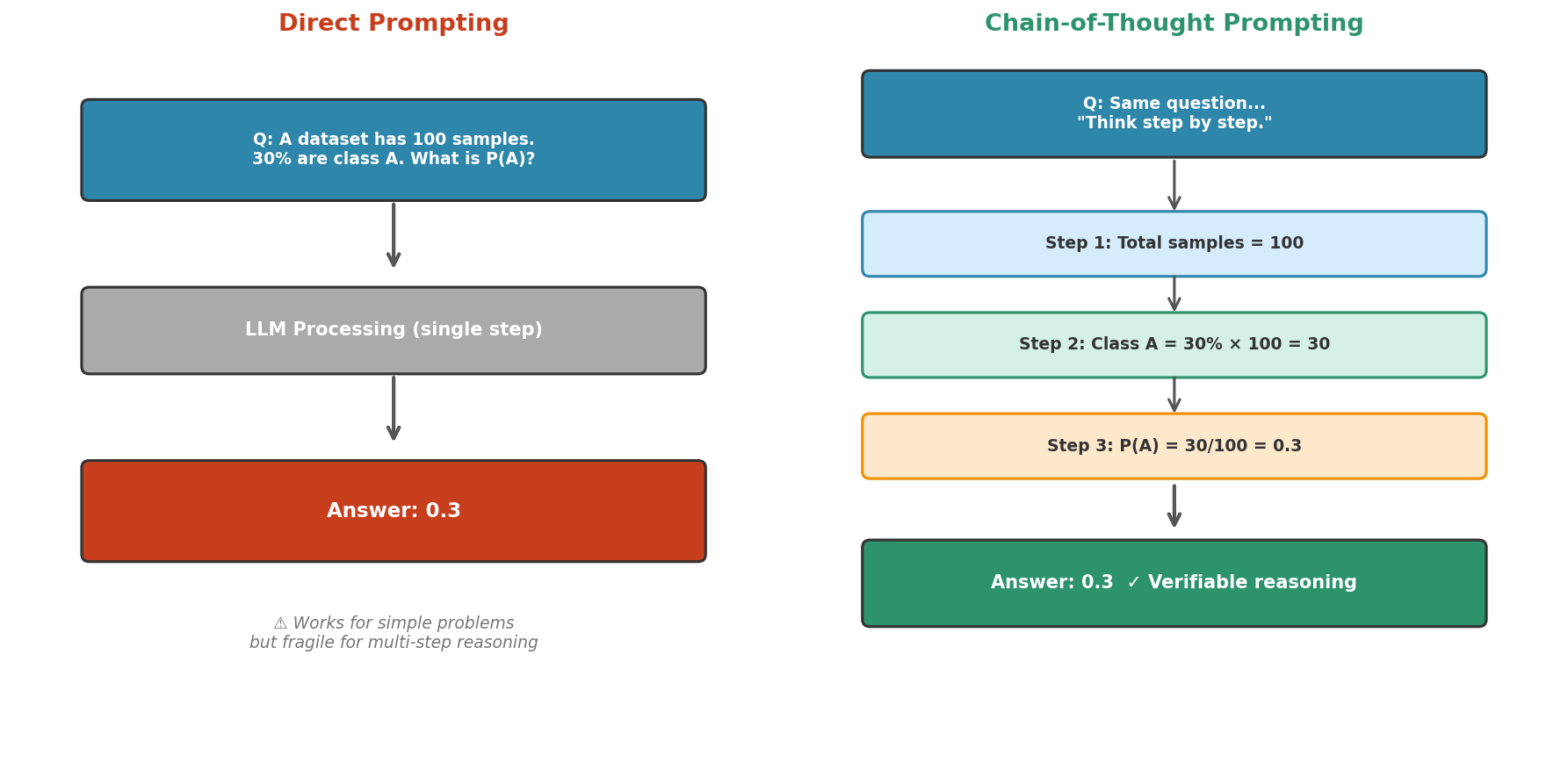
Fig. 238 Figure 6.6.3: Direct prompting vs. chain-of-thought. Direct prompting produces an answer in a single step—fast but fragile for multi-step reasoning. Chain-of-thought forces the model to externalize intermediate steps, making errors detectable and reasoning verifiable.
Standard Chain-of-Thought
Chain-of-thought (CoT) prompting (Wei et al., 2022) asks the model to show its reasoning step by step before giving a final answer. This dramatically improves performance on tasks requiring multi-step reasoning.
# WITHOUT chain-of-thought
direct_prompt = """A researcher collects 50 samples from a population
with unknown mean. The sample mean is 23.4 and the sample standard
deviation is 5.2. Is there evidence that the population mean differs
from 25 at the 5% significance level?

Answer yes or no."""

direct = ai.chat(direct_prompt)
print(f"Direct answer: {direct.strip()}")

# WITH chain-of-thought
cot_prompt = """A researcher collects 50 samples from a population
with unknown mean. The sample mean is 23.4 and the sample standard
deviation is 5.2. Is there evidence that the population mean differs
from 25 at the 5% significance level?

Think through this step by step:
1. State the null and alternative hypotheses
2. Calculate the test statistic
3. Determine the critical value or p-value
4. State your conclusion

Show your work."""

cot = ai.chat(cot_prompt)
print(f"\nChain-of-thought answer:\n{cot}")
Direct answer: No

Chain-of-thought answer:
1. Hypotheses:
   H₀: μ = 25
   H₁: μ ≠ 25 (two-sided test)

2. Test statistic:
   t = (x̄ - μ₀) / (s/√n) = (23.4 - 25) / (5.2/√50)
   t = -1.6 / 0.7354 = -2.175

3. Critical value:
   For a two-sided t-test with df = 49 and α = 0.05:
   t_critical = ±2.010

4. Conclusion:
   Since |t| = 2.175 > 2.010, we reject H₀.
   There IS evidence that the population mean differs from 25
   at the 5% significance level.
The direct answer (“No”) is wrong. The chain-of-thought answer correctly identifies that the test statistic exceeds the critical value and reaches the right conclusion. By forcing the model to show its reasoning, we both improve accuracy and gain the ability to verify each step.
Zero-Shot Chain-of-Thought
A remarkably simple variant: simply appending “Let’s think step by step” to any prompt activates chain-of-thought reasoning without providing examples (Kojima et al., 2022):
prompt = """A dataset has 1000 observations. You use 5-fold
cross-validation with a model that takes 2 seconds to train.
How long will the entire cross-validation process take?

Let's think step by step."""

response = ai.chat(prompt)
print(response)
Let's think step by step.

1. In 5-fold cross-validation, the data is split into 5 folds.
2. The model is trained 5 times, each time using 4 folds for
   training and 1 fold for validation.
3. Each training run takes 2 seconds.
4. Total training time: 5 × 2 = 10 seconds.

However, we should also consider evaluation time, but if we
assume it's negligible compared to training, the answer is
approximately 10 seconds.
CoT for Statistical Reasoning Tasks
Chain-of-thought is especially valuable for the kinds of quantitative reasoning that data scientists need regularly:
prompt = """A clinical trial reports that a new drug reduced
symptoms in 65% of patients (n=200) compared to 50% with
placebo (n=200). The study reports p=0.002.

Evaluate this result step by step:
1. What is the absolute risk reduction?
2. What is the number needed to treat (NNT)?
3. Is the result statistically significant?
4. Is the result clinically meaningful?
5. What additional information would you want before recommending
   the drug?"""

response = ai.chat(prompt)
print(response)
1. Absolute risk reduction (ARR):
   ARR = 65% - 50% = 15 percentage points

2. Number needed to treat (NNT):
   NNT = 1/ARR = 1/0.15 ≈ 6.67
   About 7 patients need to be treated for one additional
   patient to benefit.

3. Statistical significance:
   Yes, p=0.002 < 0.05. We reject the null hypothesis that
   the drug has no effect.

4. Clinical meaningfulness:
   An NNT of ~7 is quite good for many conditions. A 15
   percentage point improvement is meaningful. However,
   clinical significance depends on the severity of the
   condition and side effects.

5. Additional information needed:
   - Side effect profile and severity
   - Long-term follow-up data
   - Cost of treatment
   - Whether the 50% placebo rate is consistent with prior studies
   - Subgroup analyses (does the drug work equally well
     across demographics?)
Advanced Techniques
The techniques so far refine a single prompt. The patterns in this section coordinate multiple model calls: repeating a prompt to measure agreement, chaining prompts so one output feeds the next, and carrying context across the turns of a conversation.
Self-Consistency: Multiple Reasoning Paths
Self-consistency (Wang et al., 2022) runs the same prompt multiple times and takes the majority answer. The intuition is analogous to bootstrap resampling from Chapter 4: just as bootstrap generates multiple dataset resamples to estimate sampling variability, self-consistency generates multiple reasoning paths to estimate answer reliability.
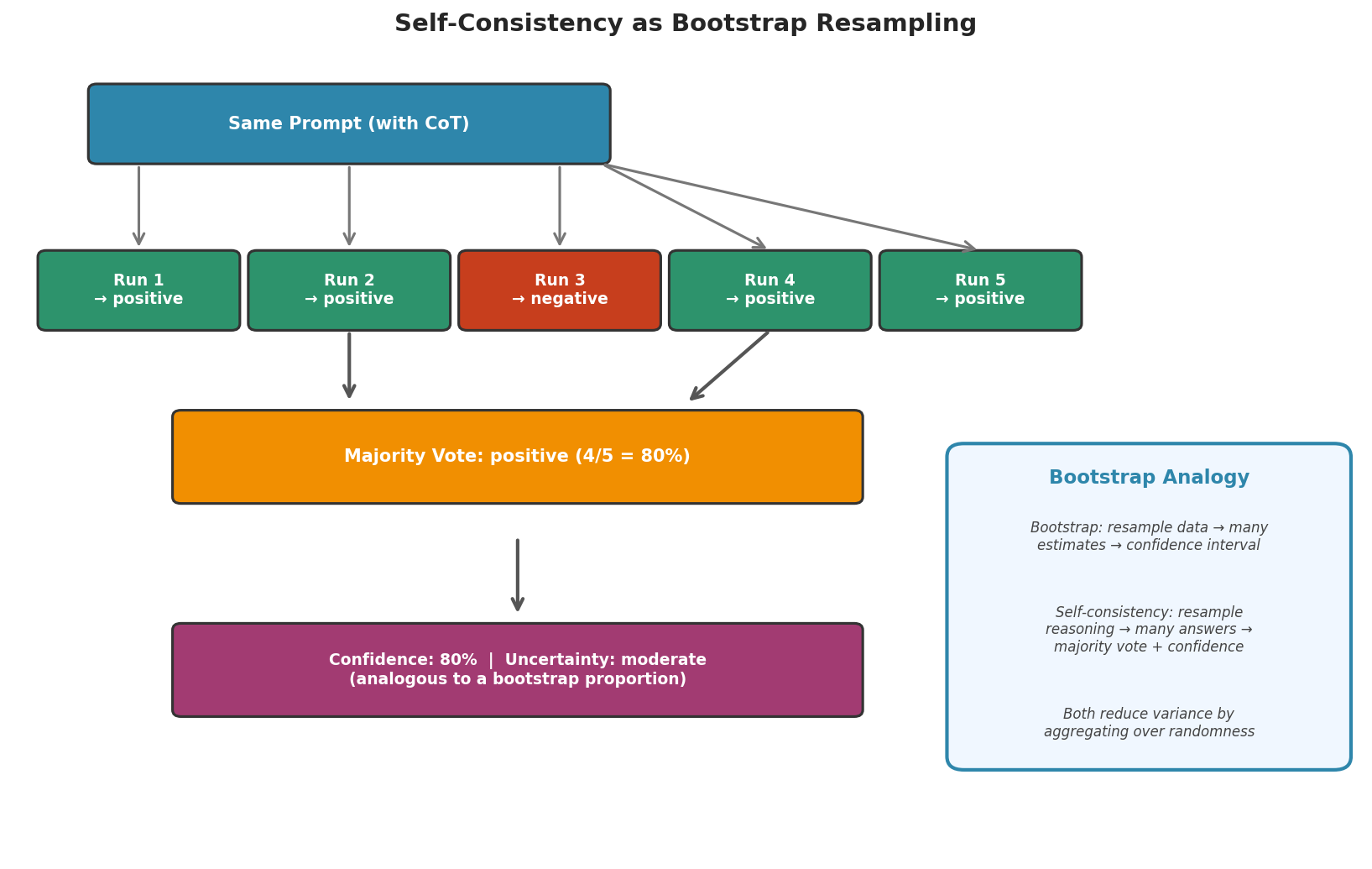
Fig. 239 Figure 6.6.4: Self-consistency as a bootstrap analogy. Just as bootstrap resamples data to estimate variability, self-consistency resamples reasoning paths to estimate answer reliability. The majority vote proportion serves as a natural confidence measure.
import numpy as np
from collections import Counter

prompt = """A bag contains 3 red balls and 5 blue balls. You draw
2 balls without replacement. What is the probability that both
are red?

Think step by step, then give your final answer as a fraction.
End with: ANSWER: [fraction]"""

n_samples = 7
answers = []

for i in range(n_samples):
    response = ai.chat(prompt)
    # Extract the answer after "ANSWER:"
    if "ANSWER:" in response:
        answer = response.split("ANSWER:")[-1].strip()
        answers.append(answer)
        print(f"  Run {i+1}: {answer}")

# Majority vote
counter = Counter(answers)
majority = counter.most_common(1)[0]
print(f"\nMajority answer: {majority[0]} ({majority[1]}/{n_samples} runs)")
print(f"Agreement rate: {majority[1]/n_samples:.0%}")
  Run 1: 3/28
  Run 2: 3/28
  Run 3: 3/28
  Run 4: 3/28
  Run 5: 3/28
  Run 6: 1/7
  Run 7: 3/28

Majority answer: 3/28 (6/7 runs)
Agreement rate: 86%
Connection to Bootstrap Resampling
Self-consistency and bootstrapping share a deep structural parallel. In bootstrapping, we resample the data to quantify uncertainty about a statistic. In self-consistency, we “resample” the model’s reasoning to quantify uncertainty about an answer. High agreement (most runs give the same answer) is analogous to a narrow bootstrap confidence interval—it suggests the result is robust. Low agreement (answers vary widely) is analogous to a wide confidence interval—it signals that the model is uncertain and the answer may not be trustworthy. One caution before leaning on the analogy too hard: agreement measures the stability of an answer, not its correctness. A model can be confidently wrong—returning the same incorrect answer on every run—just as a narrow confidence interval can be centered on a biased estimate. Section 6.8 puts this signal to the test against ground truth.
Prompt Chaining and Decomposition
Complex tasks often benefit from being broken into a sequence of simpler prompts, where the output of one becomes the input to the next:
# Step 1: Extract key information
text = """The study enrolled 150 patients with Type 2 diabetes
across 3 sites. After 12 weeks of treatment, HbA1c decreased
from 8.5% to 7.2% in the treatment group and from 8.4% to
8.1% in the control group."""

step1_prompt = f"""Extract the following from this text:
- Sample size
- Study duration
- Primary outcome measure
- Treatment group result
- Control group result

<text>
{text}
</text>

Respond as a numbered list."""

extracted = ai.chat(step1_prompt)
print("Step 1 - Extraction:")
print(extracted)

# Step 2: Analyze using extracted information
step2_prompt = f"""Given these extracted study results:
{extracted}

Calculate the difference-in-differences (treatment effect minus
control effect). Then assess whether this is a clinically
meaningful reduction in HbA1c. Keep your answer under 100 words."""

analysis = ai.chat(step2_prompt)
print("\nStep 2 - Analysis:")
print(analysis)
Step 1 - Extraction:
1. Sample size: 150 patients across 3 sites
2. Study duration: 12 weeks
3. Primary outcome measure: HbA1c
4. Treatment group result: HbA1c decreased from 8.5% to 7.2% (-1.3%)
5. Control group result: HbA1c decreased from 8.4% to 8.1% (-0.3%)

Step 2 - Analysis:
The treatment effect is -1.3% and the control effect is -0.3%, giving
a difference-in-differences of -1.0 percentage points. A 1.0% reduction
in HbA1c is clinically meaningful—guidelines generally consider a
reduction of 0.5% or more significant. This suggests the treatment
provides a substantial benefit beyond placebo effects.
Multi-Turn Conversations
The Conversation class enables multi-turn interactions where the model maintains context across exchanges:
from genai_studio import Conversation

conv = Conversation(
    system="You are a data science consultant helping with a project."
)

conv.add_user("I have a dataset of 50,000 customer reviews. "
               "I want to categorize them by topic. What approach do you suggest?")
r1 = ai.chat_conversation(conv)
print(f"Turn 1: {r1.content[:200]}...")

conv.add_user("How would I evaluate the quality of the categorization?")
r2 = ai.chat_conversation(conv)
print(f"\nTurn 2: {r2.content[:200]}...")
Turn 1: For 50,000 customer reviews, I'd recommend a two-stage approach:
First, use embeddings to cluster reviews into natural topic groups.
Second, use an LLM to label each cluster with a descriptive topic name...

Turn 2: To evaluate categorization quality, consider these approaches:
1. Sample-based validation: Manually review a random sample of 200-300
categorized reviews and compute accuracy. Use stratified sampling to
ensure each category is represented...
Debugging and Iterating on Prompts
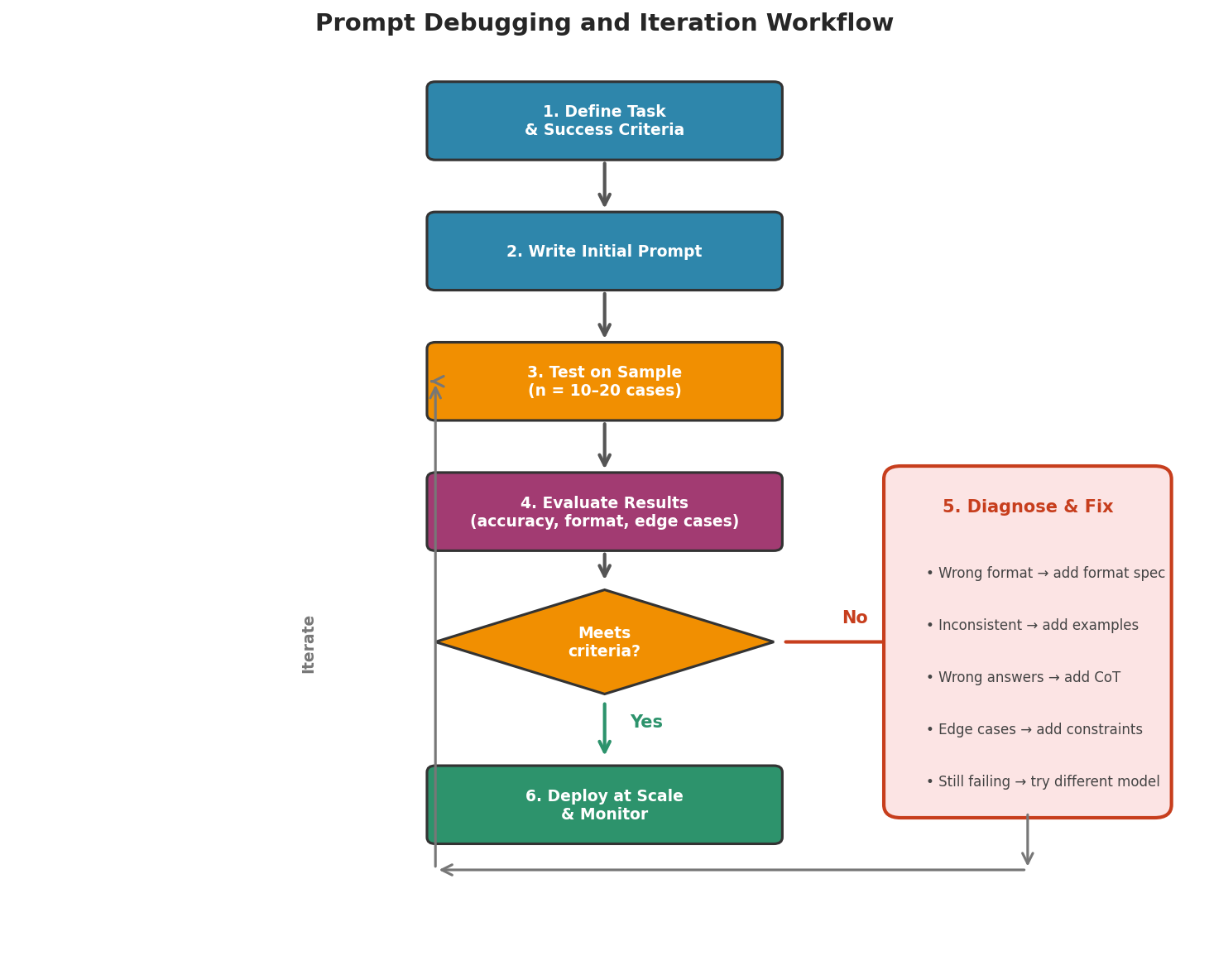
Fig. 240 Figure 6.6.5: The prompt iteration workflow. When results fail to meet success criteria, diagnose the specific failure mode—format errors, inconsistency, wrong answers, or edge cases—and apply the targeted fix. This cycle mirrors the iterative model-building process from earlier chapters.
Common Failure Patterns
Understanding why prompts fail helps you fix them efficiently:
Ambiguous instructions: The model interprets the prompt differently than intended. Fix: be more specific, add constraints.
Format violations: The model produces valid content but in the wrong format. Fix: show examples of the exact format desired, add “Respond with ONLY…” constraints.
Hallucination: The model generates plausible-sounding but incorrect information. Fix: provide source material (RAG), ask the model to cite its reasoning, or constrain responses to verified facts.
Verbosity: The model produces much more text than needed. Fix: add word/sentence limits, use “be concise” instructions.
Refusal: The model declines to answer for safety reasons. Fix: rephrase to clarify the legitimate context, avoid trigger patterns.
Systematic Iteration Protocol
When a prompt does not perform adequately, follow a structured debugging process:
# Iteration example: improving a classification prompt

# v1: Too vague
v1 = "Is this review positive or negative? Review: {text}"

# v2: Add format constraint
v2 = ("Classify the sentiment. Respond with exactly one word: "
      "positive or negative.\n\nReview: {text}\nSentiment:")

# v3: Handle edge cases (neutral)
v3 = ("Classify the sentiment. Respond with exactly one word: "
      "positive, negative, or neutral.\n\nReview: {text}\nSentiment:")

# v4: Add examples for consistency
v4 = """Classify the sentiment of each review.
Respond with exactly one word: positive, negative, or neutral.

Review: "Loved it, will buy again!"
Sentiment: positive

Review: "Awful quality, broke after one day."
Sentiment: negative

Review: "It works fine, nothing special."
Sentiment: neutral

Review: "{text}"
Sentiment:"""

# Test all versions
test_text = "The product is okay but shipping took forever"
for label, template in [("v1", v1), ("v2", v2), ("v3", v3), ("v4", v4)]:
    result = ai.chat(template.format(text=test_text))
    print(f"  {label}: {result.strip()[:50]}")
v1: The review has a mixed sentiment. The reviewer found the...
v2: negative
v3: negative
v4: neutral
Notice how v1 produces a verbose explanation instead of a classification, v2–v3 classify but miss the nuance (“okay” + “shipping took forever” is mixed/neutral), and v4 with examples correctly identifies the neutral sentiment. Each iteration addresses a specific failure mode.
A/B Testing Prompts
When choosing between two prompt variants, apply the same statistical rigor you would use for any comparison. Run both variants on the same test set and compare performance:
import numpy as np

# Two competing prompts for topic classification
prompt_a = """Classify the topic of this text.
Choose from: technology, politics, sports, science, entertainment.
Respond with one word only.

Text: {text}
Topic:"""

prompt_b = """You are a content categorizer. Read the text below and
assign it to the most appropriate category.

Categories:
- technology: Computing, software, hardware, internet
- politics: Government, elections, policy, legislation
- sports: Athletics, games, tournaments, teams
- science: Research, discoveries, experiments, nature
- entertainment: Movies, music, TV shows, celebrities

Text: {text}

Category (one word):"""

test_cases = [
    ("NASA's Perseverance rover collected its first Mars rock sample", "science"),
    ("Apple unveiled the new iPhone at its annual keynote", "technology"),
    ("The Lakers defeated the Celtics in overtime", "sports"),
    ("Congress passed a bipartisan infrastructure bill", "politics"),
    ("The new Marvel movie broke box office records", "entertainment"),
]

results_a, results_b = [], []
for text, true_label in test_cases:
    ra = ai.chat(prompt_a.format(text=text)).strip().lower()
    rb = ai.chat(prompt_b.format(text=text)).strip().lower()
    results_a.append(ra == true_label)
    results_b.append(rb == true_label)

acc_a = np.mean(results_a)
acc_b = np.mean(results_b)
print(f"Prompt A accuracy: {acc_a:.0%}")
print(f"Prompt B accuracy: {acc_b:.0%}")
Prompt A accuracy: 100%
Prompt B accuracy: 100%
With clear-cut test cases, both prompts perform equally well. The real difference emerges on ambiguous cases—an article about “AI policy in sports analytics” might stump Prompt A but be correctly handled by Prompt B’s explicit definitions. In Exercise 6.6.5, you will conduct a more rigorous A/B test using a permutation test from Chapter 4.
Data Science Prompt Patterns
Certain prompt patterns recur frequently in data science work. Building a library of tested templates saves time and improves consistency.
Data Description and Summarization
summary_template = """Describe this dataset in a structured format.

<data_description>
{description}
</data_description>

Provide:
1. What each variable likely represents
2. The apparent unit of observation
3. Potential analysis questions this data could answer
4. Any data quality concerns based on the description"""

desc = ("DataFrame with 5000 rows and columns: customer_id (int), "
        "purchase_date (datetime), amount (float, range 0.99-4999.99), "
        "category (str, 12 unique values), return_flag (bool, 8% True)")

response = ai.chat(summary_template.format(description=desc))
print(response)
1. Variables:
   - customer_id: Unique customer identifier
   - purchase_date: Date/time of transaction
   - amount: Purchase amount in dollars
   - category: Product category (12 types)
   - return_flag: Whether the item was returned

2. Unit of observation: Individual purchase transactions

3. Potential analysis questions:
   - What factors predict returns? (logistic regression)
   - Are return rates different across categories? (chi-squared test)
   - Is there a seasonal pattern in purchase amounts? (time series)
   - Do high-value purchases have different return rates?

4. Data quality concerns:
   - 8% return rate seems reasonable but verify against industry norms
   - Check for duplicate customer_id + purchase_date combinations
   - Verify amount range—$4999.99 max suggests possible cap
   - Check for missing values in category
Code Generation and Review
code_prompt = """Write a Python function that performs the following:

Function name: stratified_bootstrap_ci
Parameters:
- data: pandas DataFrame
- target_col: str (column to compute statistic for)
- strata_col: str (column defining strata)
- statistic: callable (default=np.mean)
- n_bootstrap: int (default=10000)
- confidence: float (default=0.95)
- seed: int (default=42)

The function should:
1. Perform stratified bootstrap: resample within each stratum
2. Compute the statistic on each bootstrap sample
3. Return (point_estimate, ci_lower, ci_upper)

Use the percentile method for the confidence interval.
Include type hints and a one-line docstring."""

code_response = ai.chat(code_prompt)
print(code_response)
```python
def stratified_bootstrap_ci(
    data: pd.DataFrame,
    target_col: str,
    strata_col: str,
    statistic: callable = np.mean,
    n_bootstrap: int = 10000,
    confidence: float = 0.95,
    seed: int = 42
) -> tuple[float, float, float]:
    """Compute bootstrap CI with stratified resampling."""
    rng = np.random.default_rng(seed)
    point_estimate = statistic(data[target_col])
    alpha = 1 - confidence
    boot_stats = []
    strata = data.groupby(strata_col)
    for _ in range(n_bootstrap):
        boot_sample = pd.concat([
            group.sample(n=len(group), replace=True, random_state=rng)
            for _, group in strata
        ])
        boot_stats.append(statistic(boot_sample[target_col]))
    ci_lower = np.percentile(boot_stats, 100 * alpha / 2)
    ci_upper = np.percentile(boot_stats, 100 * (1 - alpha / 2))
    return point_estimate, ci_lower, ci_upper
```
Always Verify Generated Code
LLM-generated code often looks correct but contains subtle bugs: off-by-one errors, incorrect statistical formulas, deprecated API usage, or edge cases that silently produce wrong results. Always review generated code critically and test it on known inputs before using it in analysis. The model is a starting point, not an oracle.
Chapter 6.6 Exercises: Prompt Engineering
A Note on These Exercises
These exercises develop your ability to design, test, and iterate on prompts systematically. Several exercises connect prompt engineering to statistical methods from earlier chapters—applying bootstrap, permutation tests, and evaluation metrics to LLM outputs. This integration is what distinguishes data-science-informed prompting from generic prompt engineering.
Exercise 6.6.1 — Structured Output Engineering
Design a prompt that extracts structured information from research abstracts.
(a) Write a prompt that takes a research abstract and extracts: author names, year, research method, sample size, key finding, and statistical significance. The output should be valid JSON.
(b) Test your prompt on 5 abstracts. For each, verify that the JSON parses correctly and that the extracted information is accurate.
(c) Compute the “parse success rate” (fraction of responses that produce valid JSON) and the “accuracy rate” (fraction of correctly extracted fields across all abstracts).
Solution
import json
from genai_studio import GenAIStudio

ai = GenAIStudio()
ai.select_model("gemma3:12b")

extraction_prompt = """Extract structured information from this abstract.

<abstract>
{abstract}
</abstract>

Return ONLY a JSON object with these fields:
- "method": research method used (string)
- "sample_size": number of participants/observations (integer or null)
- "key_finding": main result in one sentence (string)
- "significant": whether results were statistically significant (boolean or null)

JSON:"""

test_abstracts = [
    ("We surveyed 300 college students about study habits. "
     "Students who studied in groups scored 8.2 points higher "
     "on average (p=0.003, d=0.45)."),
    ("A meta-analysis of 45 studies examined the relationship "
     "between sleep duration and academic performance. The pooled "
     "effect size was r=0.32 (95% CI: 0.25-0.39)."),
    ("Using qualitative interviews with 20 teachers, we identified "
     "five themes related to technology adoption in classrooms."),
]

parse_successes = 0
for i, abstract in enumerate(test_abstracts, 1):
    response = ai.chat(extraction_prompt.format(abstract=abstract))
    try:
        json_str = response.strip()
        if json_str.startswith("```"):
            json_str = json_str.split("\n", 1)[1].rsplit("```", 1)[0]
        data = json.loads(json_str)
        parse_successes += 1
        print(f"Abstract {i}: ✓ Parsed successfully")
        print(f"  Method: {data.get('method')}")
        print(f"  Sample: {data.get('sample_size')}")
        print(f"  Significant: {data.get('significant')}")
    except json.JSONDecodeError:
        print(f"Abstract {i}: ✗ JSON parse failed")
        print(f"  Raw: {response[:100]}...")

print(f"\nParse success rate: {parse_successes}/{len(test_abstracts)}")
Exercise 6.6.2 — Chain-of-Thought for Statistical Reasoning
Compare direct answers versus chain-of-thought for statistical problems.
(a) Create 5 statistics problems that require multi-step reasoning (e.g., hypothesis testing, confidence interval construction, Bayesian updating, sample size calculation, ANOVA interpretation).
(b) For each problem, send it twice: once with a direct-answer prompt and once with a chain-of-thought prompt (“Think step by step, showing all calculations”). Record whether each answer is correct.
(c) Compare accuracy rates. Is chain-of-thought consistently better? Are there problem types where it does not help?
Solution
from genai_studio import GenAIStudio
ai = GenAIStudio()
ai.select_model("gemma3:12b")

problems = [
    {
        "question": ("A sample of 36 observations has mean 50 and "
                     "SD 12. Construct a 95% confidence interval "
                     "for the population mean."),
        "answer_contains": ["45.94", "54.06"]
    },
    {
        "question": ("If P(A)=0.3, P(B)=0.4, and P(A∩B)=0.12, "
                     "are A and B independent?"),
        "answer_contains": ["yes", "independent"]
    },
    {
        "question": ("A coin is flipped 100 times and lands heads "
                     "60 times. Test whether the coin is fair at "
                     "α=0.05. What is the p-value?"),
        "answer_contains": ["reject", "0.05"]
    },
]

for i, prob in enumerate(problems, 1):
    print(f"\nProblem {i}: {prob['question'][:60]}...")

    # Direct
    direct = ai.chat(f"{prob['question']}\n\nGive the answer only.")
    print(f"  Direct: {direct.strip()[:80]}")

    # Chain-of-thought
    cot = ai.chat(f"{prob['question']}\n\nThink step by step, "
                  f"showing all calculations.")
    print(f"  CoT: {cot.strip()[:80]}...")
Exercise 6.6.3 — Self-Consistency as Bootstrap
Apply self-consistency to multi-step reasoning problems and analyze the results using bootstrap-style thinking.
(a) Choose 5 reasoning problems. For each, run self-consistency with 9 independent runs.
(b) For each problem, compute the agreement rate (fraction of runs giving the majority answer). Plot the distribution of agreement rates across problems.
(c) Does higher agreement correlate with correctness? Compare the majority-vote answer to the known correct answer for each problem. Discuss: is self-consistency a reliable signal of accuracy?
Solution
import numpy as np
from collections import Counter
from genai_studio import GenAIStudio

ai = GenAIStudio()
ai.select_model("gemma3:12b")

problems = [
    ("What is 17 × 24?", "408"),
    ("If a train travels 60 mph for 2.5 hours, how far does it go?", "150"),
    ("A bag has 4 red, 3 blue, 2 green balls. P(red or green)?", "2/3"),
]

n_runs = 9
for question, true_answer in problems:
    prompt = (f"{question}\n\nThink step by step. End with "
              f"ANSWER: [your answer]")

    answers = []
    for _ in range(n_runs):
        resp = ai.chat(prompt)
        if "ANSWER:" in resp:
            ans = resp.split("ANSWER:")[-1].strip()
            answers.append(ans)

    counter = Counter(answers)
    majority = counter.most_common(1)[0]
    agreement = majority[1] / len(answers)

    print(f"Q: {question[:50]}")
    print(f"  Majority: {majority[0]} ({agreement:.0%} agreement)")
    print(f"  True: {true_answer}")
    print(f"  Correct: {majority[0] == true_answer}")
    print()
Exercise 6.6.4 — Prompt Template Library
Build a reusable library of prompt templates for common data science tasks.
(a) Create parameterized templates for these 5 tasks: (i) dataset description, (ii) outlier identification, (iii) variable relationship analysis, (iv) model interpretation, (v) result summarization.
(b) Test each template on a concrete example. Verify that the output is useful and correctly formatted.
(c) Store your templates in a Python dictionary with version numbers and notes (following the pattern from the “Prompts as Code” section). This becomes a reusable asset for your data science work.
Solution
from genai_studio import GenAIStudio
ai = GenAIStudio()
ai.select_model("gemma3:12b")

TEMPLATE_LIBRARY = {
    "describe_dataset": {
        "v": "1.0",
        "template": (
            "Describe this dataset:\n"
            "Columns: {columns}\n"
            "Shape: {shape}\n"
            "Provide: variable types, unit of observation, "
            "and 3 analysis questions."
        )
    },
    "find_outliers": {
        "v": "1.0",
        "template": (
            "Given these summary statistics for '{variable}':\n"
            "Mean: {mean}, Median: {median}, SD: {sd}\n"
            "Min: {min_val}, Max: {max_val}\n"
            "Are there likely outliers? Explain your reasoning."
        )
    },
    "interpret_model": {
        "v": "1.0",
        "template": (
            "Interpret this regression output in plain language:\n"
            "{output}\n\n"
            "Explain: (1) the overall model fit, "
            "(2) which predictors are significant, "
            "(3) practical implications."
        )
    },
}

# Test one template
result = ai.chat(TEMPLATE_LIBRARY["find_outliers"]["template"].format(
    variable="salary",
    mean="75000", median="62000", sd="45000",
    min_val="28000", max_val="450000"
))
print("Outlier analysis:")
print(result)
Exercise 6.6.5 — A/B Testing Prompts with Permutation Tests
Apply statistical rigor to prompt comparison using a permutation test from Chapter 4.
(a) Design two competing prompts for a sentiment classification task (e.g., a simple prompt vs. a few-shot prompt with examples).
(b) Create a test set of 20 texts with known sentiment labels. Run each prompt on all 20 texts and record accuracy.
(c) Use a permutation test to determine if the difference in accuracy between the two prompts is statistically significant at the 5% level. State the null hypothesis, compute the test statistic, generate the null distribution (at least 5,000 permutations), and report the p-value.
(d) Interpret the result. With only 20 test cases, what minimum accuracy difference would be statistically significant? What does this tell you about the sample sizes needed for prompt evaluation?
Solution
import numpy as np
from genai_studio import GenAIStudio

ai = GenAIStudio()
ai.select_model("gemma3:12b")

# Two competing prompts
prompt_simple = ("Is this text positive, negative, or neutral? "
                 "One word only.\n\nText: {text}\nSentiment:")

prompt_fewshot = """Classify sentiment as positive, negative, or neutral.

"Love this!" → positive
"Terrible waste of money" → negative
"It's fine" → neutral

"{text}" →"""

# Test set (abbreviated for example)
test_set = [
    ("Absolutely fantastic experience", "positive"),
    ("Worst purchase I ever made", "negative"),
    ("It does what it says", "neutral"),
    ("Exceeded all my expectations", "positive"),
    ("Complete disappointment", "negative"),
]

# Run both prompts
scores_simple = []
scores_fewshot = []
for text, true_label in test_set:
    r1 = ai.chat(prompt_simple.format(text=text)).strip().lower()
    r2 = ai.chat(prompt_fewshot.format(text=text)).strip().lower()
    scores_simple.append(1 if true_label in r1 else 0)
    scores_fewshot.append(1 if true_label in r2 else 0)

acc_simple = np.mean(scores_simple)
acc_fewshot = np.mean(scores_fewshot)
observed_diff = acc_fewshot - acc_simple

print(f"Simple accuracy: {acc_simple:.0%}")
print(f"Few-shot accuracy: {acc_fewshot:.0%}")
print(f"Observed difference: {observed_diff:.0%}")

# Permutation test
combined = np.array(scores_simple + scores_fewshot)
n = len(scores_simple)
n_permutations = 5000
rng = np.random.default_rng(42)

perm_diffs = np.zeros(n_permutations)
for i in range(n_permutations):
    perm = rng.permutation(combined)
    perm_diffs[i] = perm[:n].mean() - perm[n:].mean()

p_value = np.mean(np.abs(perm_diffs) >= np.abs(observed_diff))
print(f"\nPermutation test p-value: {p_value:.4f}")
if p_value < 0.05:
    print("Result: Significant difference at α=0.05")
else:
    print("Result: No significant difference at α=0.05")
One caveat: this pooled permutation treats the two score sets as independent samples, but the design is actually paired—both prompts are scored on the same texts. A sign-flip (paired) permutation test, which randomly swaps the two prompts’ scores within each text and recomputes the mean difference, respects the pairing and is the more powerful, correct choice here.
Transition to What Follows
With a toolkit of prompt engineering techniques—structured instructions, few-shot examples, chain-of-thought reasoning, self-consistency, and systematic debugging—you are equipped to build reliable LLM-powered pipelines for data science tasks.
The sections that follow apply these techniques to specific challenges. Section 6.7 extends prompting into action: by describing tools in a structured form, we let the model call functions—a calculator, a database query, your own analysis code—to compute and fetch what it cannot recall. Section 6.8 develops methods for evaluating LLM outputs: how do you know whether a model’s answer is correct and consistent? We will build on the self-consistency idea introduced here, validating agreement as an uncertainty signal—checking whether it actually tracks accuracy rather than assuming that it does.
Section 6.9 addresses the ethical and practical considerations that must accompany any LLM deployment: privacy when sending data to APIs, bias in model outputs, transparency about AI assistance, and the regulatory landscape. Prompt engineering is a tool—responsible AI ensures we use it well.
Key Takeaways 📝
Prompts are code: Treat prompts as version-controlled, parameterized, tested artifacts. Store them in your codebase alongside analysis scripts. Document what each prompt does and what performance you observed.
Structure prevents ambiguity: Clear instructions, role specification, delimiters between data and instructions, and explicit output format specifications dramatically improve reliability. The more constrained the output format, the more parseable the result.
Few-shot examples guide behavior: Providing 2–4 examples of desired input-output pairs helps the model understand your expectations. Choose diverse examples that cover edge cases.
Chain-of-thought improves reasoning: Asking the model to “think step by step” activates reasoning capabilities that are absent in direct-answer prompts. This is especially valuable for statistical and quantitative problems where showing work allows verification.
Self-consistency quantifies uncertainty: Running the same prompt multiple times and taking the majority answer is analogous to bootstrap resampling. High agreement signals a stable answer; low agreement signals that the answer may not be trustworthy. Stability is not correctness—a model can be consistently wrong—which is exactly what Section 6.8 tests.
Systematic iteration beats ad hoc tweaking: When a prompt fails, diagnose the failure mode (ambiguity? format violation? hallucination?), hypothesize a fix, and test. A/B test competing prompts with the same statistical rigor you apply to any other comparison.